If you build WordPress sites for a living, you've felt the "plugin pile-up": one plugin for custom fields, another for listings, a third for filters, a fourth for a mega menu, a fifth for popups. Each one is a separate license, a separate update, and a separate potential conflict. Crocoblock's pitch is to replace that entire pile with a single, coherent suite — and after years of using it on client projects, it's still the first toolkit I reach for when a build needs real dynamic content.
This Crocoblock review for 2026 breaks down exactly what you get, the standout plugins, the full lineup, the pricing, how it compares to the alternatives, and the honest pros and cons — so you can decide whether it belongs in your stack.

What Is Crocoblock?
Crocoblock is a suite of premium WordPress plugins — known collectively as JetPlugins — built primarily for page builders like Elementor, with mature support for Gutenberg and Bricks. Instead of selling one tool, Crocoblock ships more than twenty Jet plugins and over 150 widgets that cover dynamic content, listings, filtering, forms, popups, mega menus, WooCommerce design, booking and more.
The company has been around since 2018 and has built a reputation as the go-to dynamic-content layer for the Elementor ecosystem. It's aimed squarely at web designers, freelancers and agencies who want to ship complex, data-driven websites quickly — directories, real-estate listings, job boards, membership sites and online stores — without stitching together a dozen unrelated plugins from different vendors.
What You Can Build With Crocoblock
The fastest way to understand Crocoblock is to look at what it lets you ship without custom code. In my own client work, these are the project types where it has earned its place:
- Directory and listing sites — business directories, member directories, resource libraries with front-end filtering.
- Real-estate and property portals — searchable listings with maps, custom fields and saved favourites.
- Job boards — front-end job submission, filterable listings and application forms.
- Booking and appointment systems — services, availability and payments via JetBooking and JetAppointment.
- Membership and community sites — gated content, profiles and dynamic user dashboards.
- WooCommerce stores — fully custom product, shop and cart templates with advanced filtering.
- Recipe, review and knowledge-base sites — any project where content is structured and reused.
If your build is essentially "a database with a nice front end," Crocoblock is purpose-made for it.
Key Crocoblock Plugins Worth Knowing
The suite is huge, so rather than list all twenty-plus plugins up front, here are the ones that genuinely change how you build. (The complete lineup is in the table further down.)
JetEngine — Dynamic Content Engine
JetEngine is the crown jewel and the reason most people buy Crocoblock. It lets you create custom post types, custom taxonomies, custom fields and meta boxes, then output that data anywhere with listing grids, dynamic tables, calendars, charts and relations. It also supports query builder, custom content types stored outside the WordPress posts table (great for performance at scale), and REST API integrations. If you've ever wanted to build a property portal or a recipe site where content is structured and reusable, JetEngine is what makes it possible — visually, without code.

JetElements — 40+ Extra Widgets
JetElements adds dozens of creative widgets to your builder: advanced carousels, animated boxes, pricing tables, countdown timers, charts and interactive sections. It's the everyday workhorse that fills the gaps left by Elementor's core widgets, so you rarely need a separate "addon pack."

JetSmartFilters — Front-End Filtering
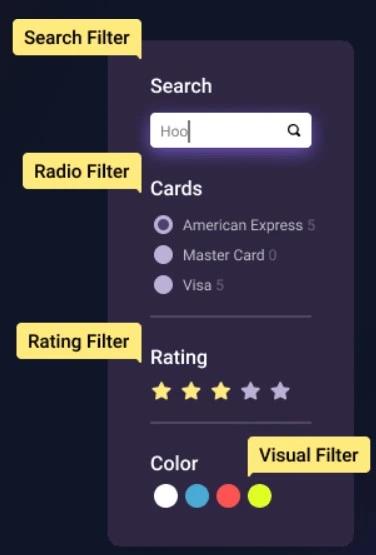
JetSmartFilters delivers the AJAX filtering you'd otherwise pay a specialist plugin for. Visitors can filter listings or WooCommerce products by checkbox, range, rating, search, date and more — with instant, no-reload results, URL-shareable filtered views, and pagination. Paired with JetEngine, it's how you build a directory or shop that's genuinely usable.
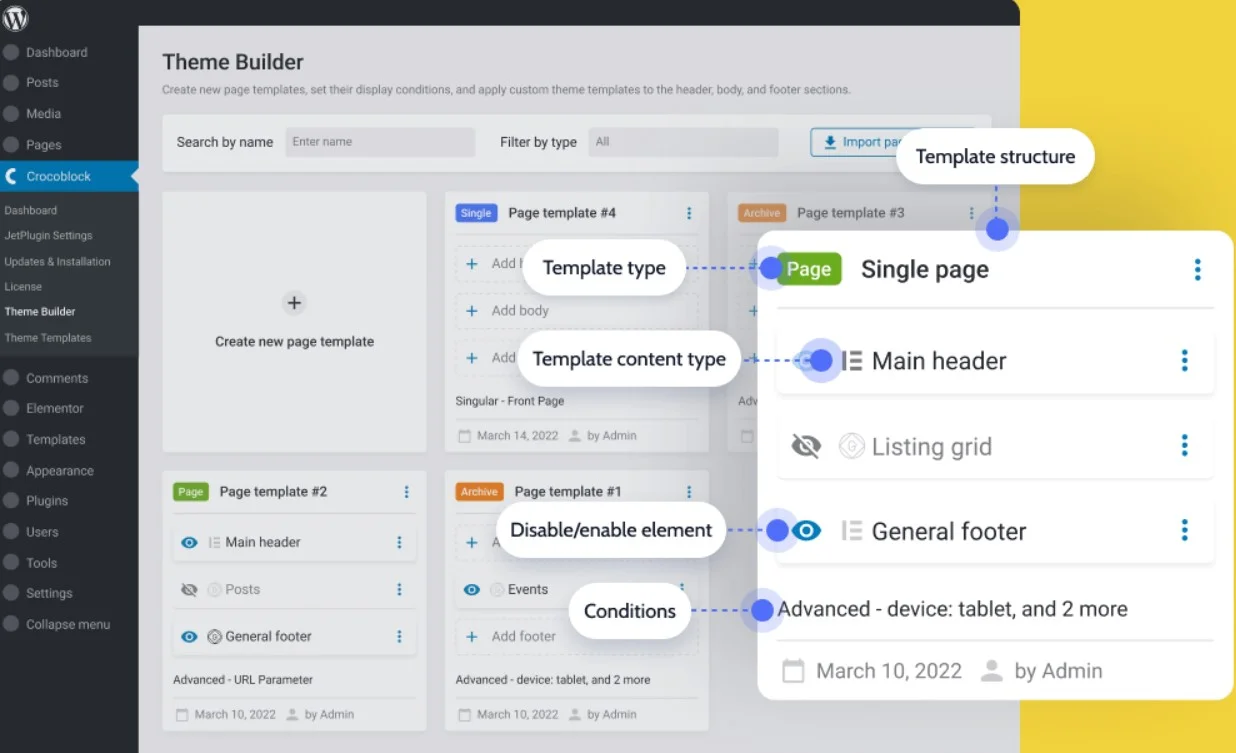
JetThemeCore — Theme Builder
JetThemeCore is your template engine. Build headers, footers, single templates, archive layouts and 404 pages, then assign them with conditions — globally, per post type, or per page. It's the structural backbone that turns a page builder into a full theme builder, comparable to Elementor Pro's Theme Builder but builder-agnostic.
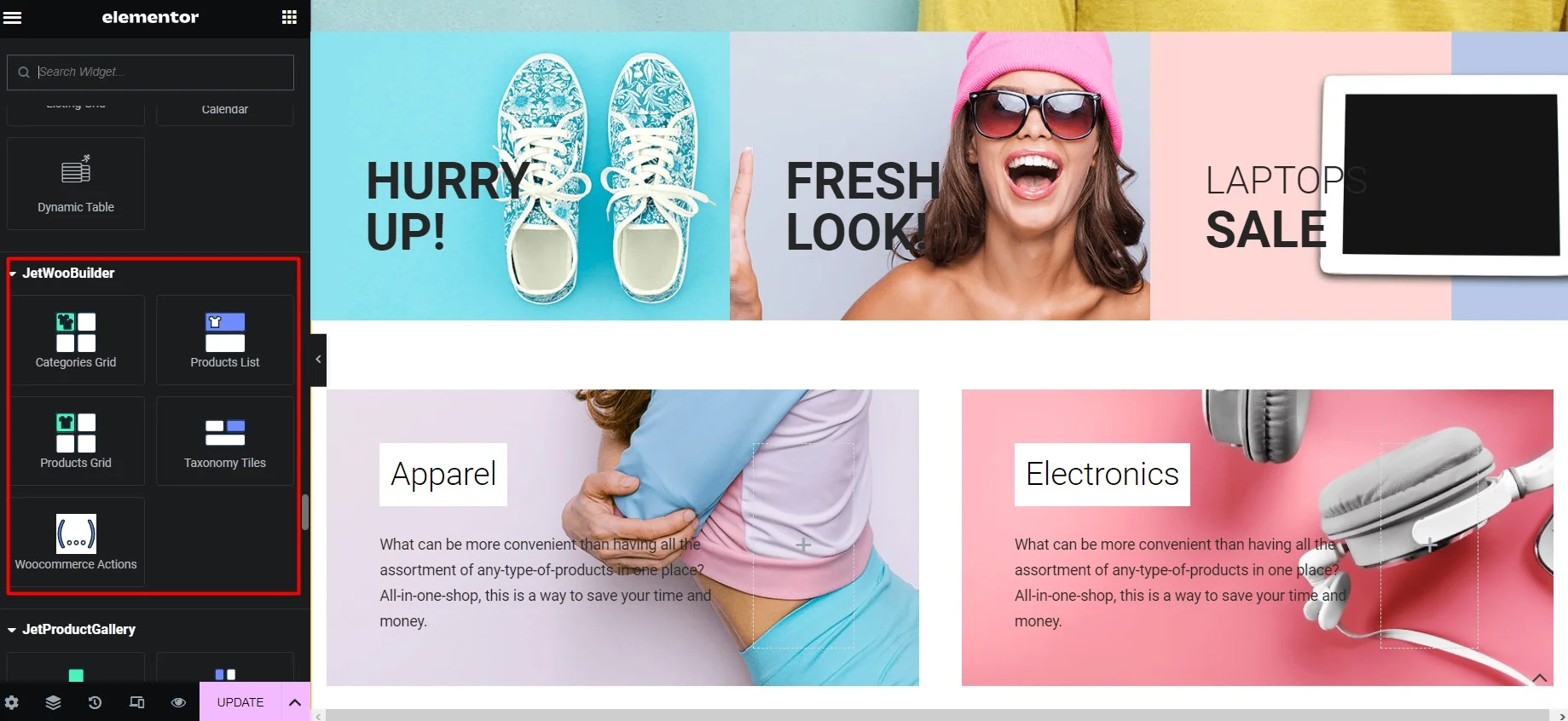
JetWooBuilder & WooCommerce Tools
For stores, JetWooBuilder lets you design single-product, shop, cart and checkout pages visually, while companion plugins add wishlists, product comparison and advanced galleries. Combined with JetSmartFilters for product filtering, it's a genuinely complete WooCommerce design layer that removes the need for several store-specific plugins.
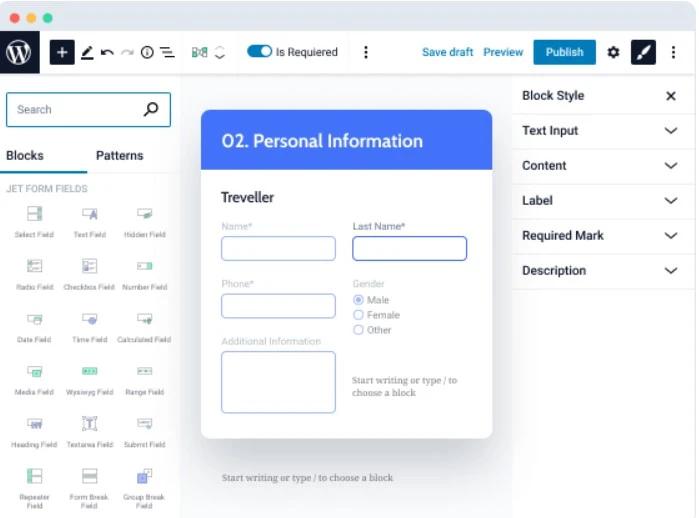
JetFormBuilder — Forms & Workflows
JetFormBuilder (also available as a standalone free plugin) builds multi-step forms with conditional logic, calculated fields, payments, post submission and integrations — enough to run quote requests, applications, surveys and front-end posting without a separate form plugin. It's one of the most capable free form builders on WordPress, and the Pro add-ons extend it further.
The Full JetPlugins Lineup
Beyond the headliners, here's the broader toolkit so you can see just how much one subscription covers:
| Plugin | What it does |
|---|---|
| JetEngine | Custom post types, fields, relations & dynamic listings |
| JetThemeCore | Header, footer, archive & single template builder |
| JetElements | 40+ extra design and content widgets |
| JetSmartFilters | AJAX front-end filtering for listings & shops |
| JetWooBuilder | Visual WooCommerce template builder |
| JetFormBuilder | Multi-step forms, payments & post submission |
| JetPopup | Conditional popups and off-canvas panels |
| JetMenu | Visual mega-menu builder |
| JetBlocks | Header/footer widgets (search, cart, login, nav) |
| JetTabs | Tabbed and accordion content layouts |
| JetReviews | User and editorial review/rating system |
| JetSearch | Smart AJAX search with live results |
| JetBooking | Rental and date-range booking systems |
| JetAppointment | Service appointment scheduling |
| JetCompareWishlist | Product comparison & wishlists |
| JetProductGallery | Advanced WooCommerce product galleries |
| JetBlog | Dynamic blog/listing widgets |
| JetTricks | Tooltips, hotspots, sticky & parallax effects |
| JetStyleManager | Global styling controls (free) |
| JetGridBuilder | Flexible grid layouts (free) |
Templates, Popups & the Magic Button
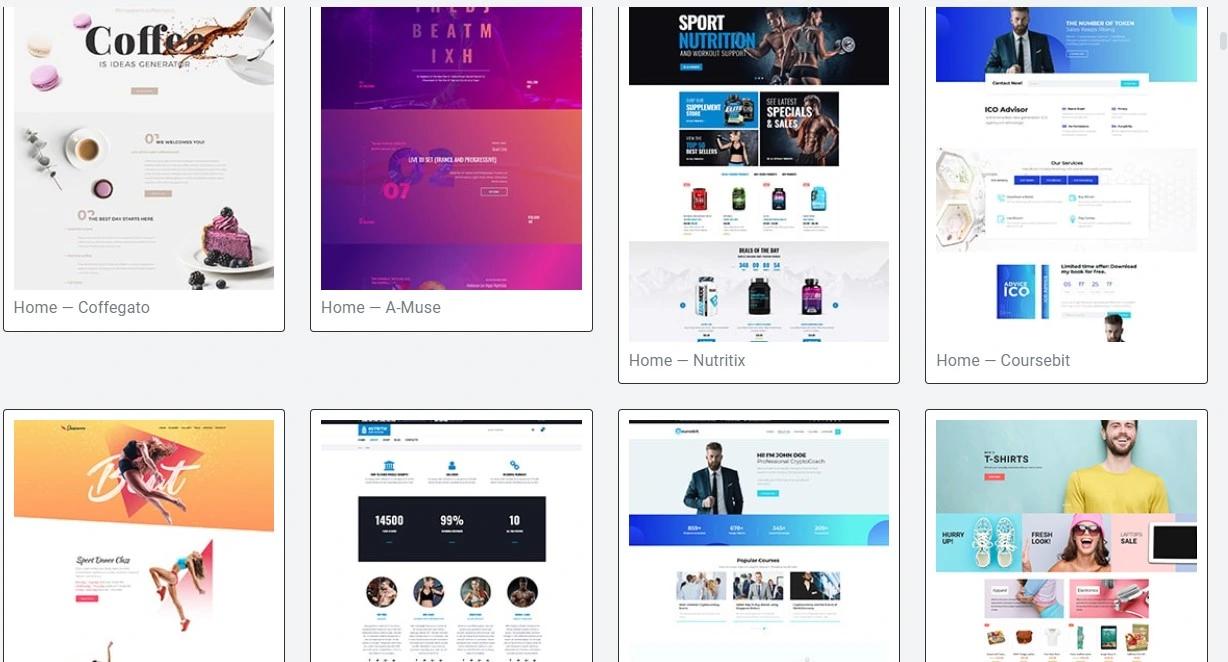
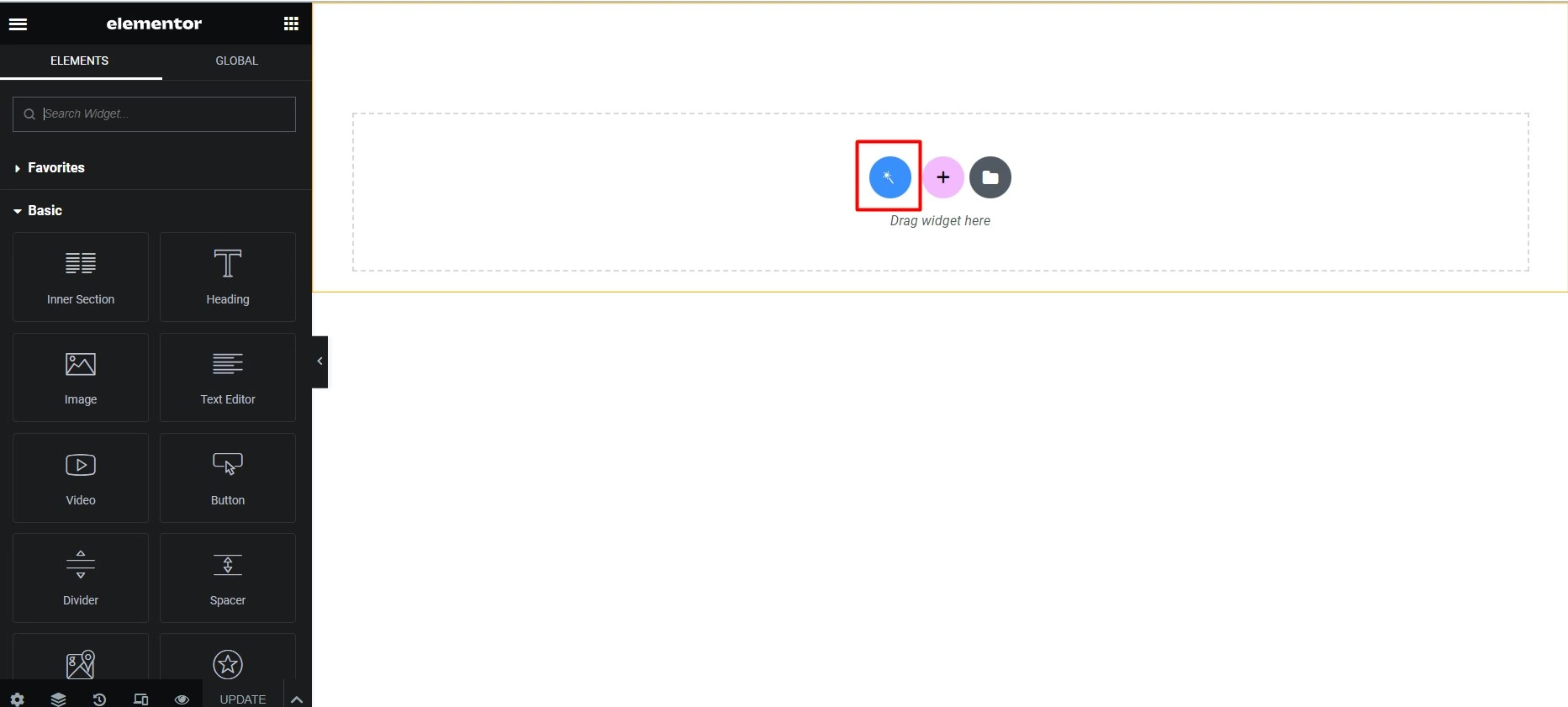
Beyond plugins, Crocoblock ships an enormous library of ready-made templates, dynamic page kits and interactive popups you can import and restyle. The Magic Button sits inside Elementor and gives you one-click access to sections, pages, headers, footers and popups — a real time-saver once a build is underway.
Is Crocoblock Easy to Set Up?
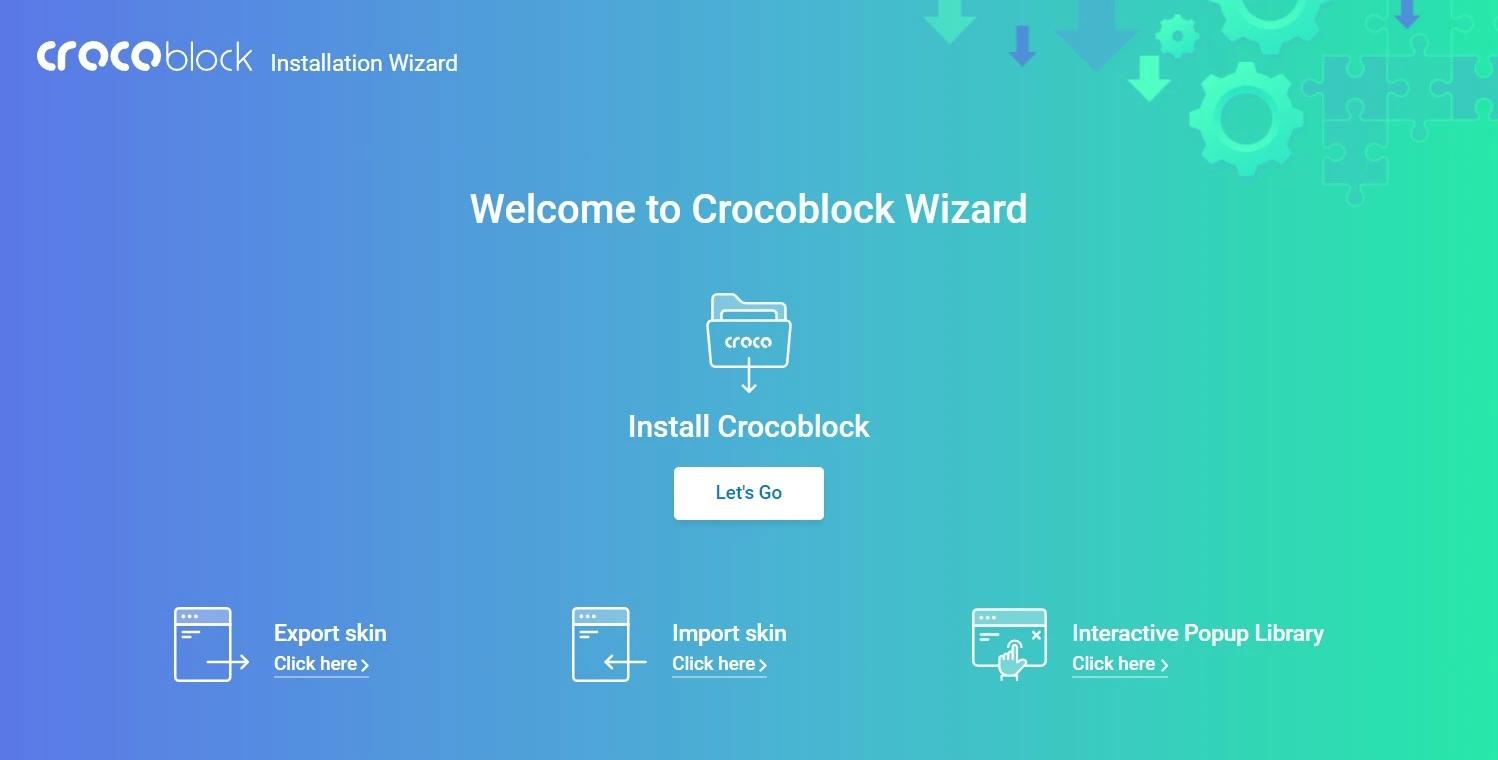
Setup is handled by an installation wizard. Visit your account, grab the suite from the downloads area, install the JetPlugins package, enter your license key, and the wizard walks you through pulling in templates, popups and dynamic kits. It's beginner-friendly to install — the depth comes later, when you start wiring up dynamic content.
Does Crocoblock Slow Down Your Website?
This is the question I get most, and the honest answer is: only if you let it. Crocoblock's plugins are reasonably well coded, but the suite's strength — breadth — is also its performance risk. Activate all twenty plugins "just in case" and you'll load scripts and styles you never use. Activate only what a project needs and a Crocoblock site can score well into the 90s on mobile PageSpeed.
Here's the discipline I apply on every Crocoblock build to keep it fast:
- Install the full suite, but only activate the specific Jet plugins that project actually uses.
- Use JetEngine's "custom content types" (stored outside the posts table) for large datasets — they query far faster than custom post types at scale.
- Pair it with solid hosting and a caching layer; dynamic listings benefit hugely from object caching.
- Lean on your builder's performance settings (optimized CSS/asset loading) and convert images to WebP.
- Audit periodically and deactivate any Jet plugin you stopped using.
Crocoblock Pricing in 2026
Crocoblock keeps pricing simple, with yearly and lifetime options split by how many sites you need.
| Plan | Sites | Price |
|---|---|---|
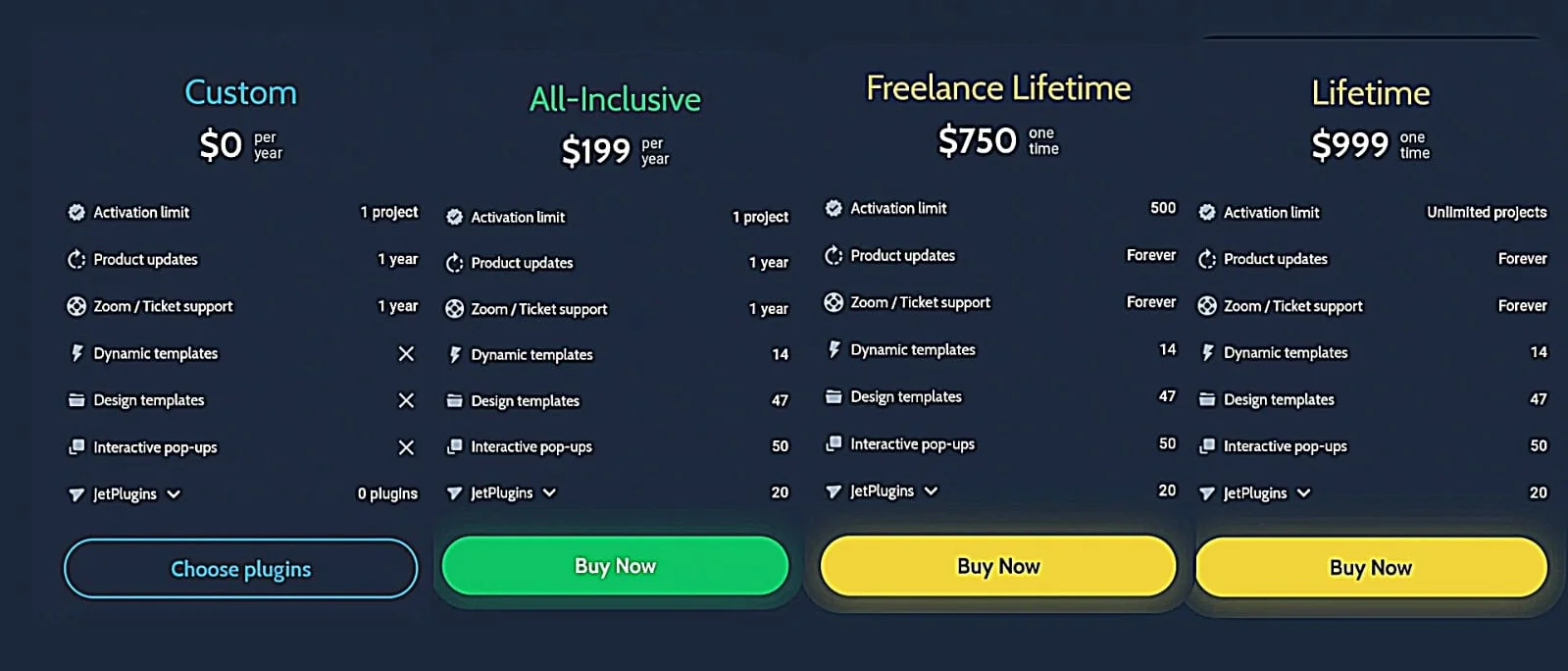
| All-Inclusive (Annual) | 1 project | $199 / year |
| All-Inclusive (Annual) | Unlimited | $399 / year |
| Freelance Lifetime | Unlimited | $750 one-time |
| Lifetime (All-Inclusive) | Unlimited | $999 one-time |
The All-Inclusive plan is where the value is: you get every Jet plugin, the full template and popup libraries, and the dynamic kits. There's also a free tier with a limited set of products, plus several genuinely free plugins like JetFormBuilder and JetStyleManager.
Crocoblock vs the Alternatives
Crocoblock isn't the only way to add dynamic content to WordPress. Here's how it stacks up against the common alternatives I've used on client work:
| Approach | Strength | Weakness | Best for |
|---|---|---|---|
| Crocoblock (Jet suite) | One coherent suite covers everything | Learning curve, bloat if undisciplined | Builders & agencies doing dynamic sites |
| Buying individual premium plugins | Pick exactly what you need | Costly, fragmented, many updates & vendors | Sites with one or two specific needs |
| ACF Pro + Toolset / Pods | Powerful, flexible data modelling | More technical, less visual output | Developers comfortable with code |
| Elementor Pro alone | Polished, simple, great theme builder | Limited listing/filtering/dynamic power | Brochure and small business sites |
| Bricks (core) | Fast, lean, developer-friendly | Fewer dynamic widgets out of the box | Performance-first developers |
The pattern: if you only have a single dynamic need, a standalone plugin may be cheaper. But the moment a project needs custom content types plus filtering plus templates plus forms, Crocoblock's all-in-one value and tight integration pull ahead — and you're dealing with one vendor and one update cycle instead of five.
Crocoblock Pros and Cons
What I Like
- One subscription replaces a stack of single-purpose plugins, which simplifies maintenance and licensing.
- JetEngine is best-in-class for dynamic, data-driven sites — directories, listings and custom CMS builds.
- It's no longer Elementor-only: Gutenberg and Bricks support make it future-proof.
- The WooCommerce toolkit is deep enough to design an entire store visually.
- Lifetime plans and a 30-day refund lower the long-term risk.
What Could Be Better
- The scope is the double-edged sword: beginners can feel overwhelmed by twenty plugins and 150 widgets.
- Installing everything "just in case" can bloat a site — be selective and only activate what a project needs.
- No free trial means you commit first and evaluate within the refund window.
- Squeezing the best value really requires the all-inclusive plan rather than the free tier.
Who Should Use Crocoblock?
Crocoblock is built for builders: freelancers and agencies shipping client sites, and developers who want dynamic functionality without writing it from scratch. If your projects involve listings, directories, booking, memberships or custom-structured content, it pays for itself quickly.
If you only run a simple brochure site or a small blog, the full suite is overkill — you'd be paying for power you won't use. In that case, a couple of free Jet plugins or your builder's core widgets are enough.
Crocoblock is the closest thing WordPress has to a no-code app builder. Once JetEngine clicks, you stop installing plugins and start designing systems.
Frequently Asked Questions
Final Verdict
Crocoblock remains the most capable dynamic-content toolkit in the WordPress ecosystem in 2026. The breadth is staggering, the value (especially on lifetime plans) is excellent, and JetEngine is in a class of its own for data-driven builds. The trade-off is a real learning curve and the discipline to avoid bloat — but for freelancers and agencies, that's a small price for what it unlocks.
If you build WordPress sites professionally, Crocoblock earns its place in your toolkit.