Most reviews of Dynamic.ooo count the widgets and stop. That is how you end up with 150 features described and not one word about why developers have been recommending this plugin to each other for the better part of a decade.
The reason is not the widget count. It is the data layer — Dynamic Posts, the ACF integration, the relationship fields, and the Dynamic Shortcodes engine underneath all of it. That is the part that changes what you can build in Elementor without writing a theme.
I have been running Dynamic Content for Elementor on production sites for five years, across everything from small business sites to directories and membership builds. I have recorded 52 tutorial videos about it on DroidCrunch, which means I have gone through roughly 95 percent of what this plugin does deliberately enough to explain it to someone else on camera. That is the basis for what follows — including the criticisms, which are the ones you only find after years rather than after an afternoon.
Verdict up front
Dynamic Content for Elementor is two plugins sharing an installer.
One half is a dynamic data layer: query-driven listings, deep ACF support, relationship fields, and a templating engine. It runs on free Elementor and it is the best implementation of this idea in the Elementor ecosystem.
The other half is a forms platform built on Elementor Pro's form widget: conditional logic, calculations, payments, PDF generation. It is the deepest forms extension available anywhere, and it requires Elementor Pro.
Buy it for either. Most people who buy it for one end up using the other within a year.
Rating: 4.5 out of 5. The ceiling is extraordinarily high and the documentation is genuinely deep. It loses half a point for a feature surface so wide that edge-case bugs are routine, and for a licence term that can lock you out of editing your own pages.
The dynamic data layer
This is the half that earned the reputation, and it is where I spend most of my time in this plugin.
Dynamic Posts
Dynamic Posts is the widget I have used on more sites than any other in the suite. It is a query builder with a visual output, and its strength is the range of things it will accept as a query source:
- Custom Post Type — the obvious one, any post type with full WP_Query control
- Dynamic – Current Query — inherits whatever query the page is already running, which is what makes it work inside archive and taxonomy templates
- ACF Relationship — feed it a relationship field and it renders the related posts
- Pods Relationship — the same for Pods
- Search & Filter Pro — hand the query off to Search & Filter Pro and let it drive
- Search Page — build a properly designed search results template
- From specific posts — hand-picked selections
- From post parent — child pages of the current page, which is how you build documentation hierarchies
That third and fourth entry are the ones people miss. Being able to point a grid at a relationship field means you build "related properties", "other products from this brand", "sessions in this track" without touching PHP. Before this existed you wrote a custom loop.
Output skins cover Grid, Grid with Filters, Accordion, Carousel, Dual Carousel and Timeline, plus 3D variants. The Grid with Filters skin is the one that saves the most time — AJAX taxonomy filtering that works out of the box, and the changelog shows they have been fixing its height-matching and pagination behaviour steadily.
The ACF integration
This is the single most important integration in the plugin, and it is more thorough than any competitor's.
ACF Repeater displays repeater fields, including nested repeaters, using an Elementor template as the row layout. You can also filter subfields to output only some rows. Anyone who has tried to render a nested repeater in a page builder knows this is the hard case, and it handles it.
Since version 3.0 the widget gained a Dynamic HTML display mode built around the data shortcode, which is where it stops being a widget and becomes a templating tool. Inside that mode you get:
That last one is a loop over an array with a separator, written inline in a widget setting. If you have ever built a "features" repeater and wanted it rendered as a comma-separated sentence rather than a list, that is one line instead of a template file.
ACF Relationship turns relationship fields into real navigable output, and pairs with Dynamic Posts as a query source. ACF Flexible Content renders flexible content layouts — the field type that most page builders simply cannot display — by mapping each layout to an Elementor template.
The plugin supports both free ACF and ACF Pro, though Repeater and Flexible Content require ACF Pro, since those field types are Pro-only in ACF itself.
Everything that is not ACF
The integration list is unusually broad, and this matters if you inherited a site built on someone else's stack:
| Data source | What is supported |
|---|---|
| Advanced Custom Fields | Fields, Repeater, nested Repeater, Flexible Content, Relationship |
| Meta Box | Fields, Relationship, Google Maps field |
| Pods | Fields, Relationship, Gallery |
| Toolset | Fields, Relationship |
| JetEngine | Field output and query integration |
| Search & Filter Pro | Full query hand-off to Dynamic Posts |
| WooCommerce | Products, wishlist, on-sale queries, add-to-cart |
| WPML | Full translation support across widgets |
The Search & Filter Pro integration deserves its own mention because it solves a specific and common problem. Search & Filter Pro is excellent at building filter UIs and mediocre at rendering results. Dynamic Posts is excellent at rendering results. Pointing one at the other gives you faceted search with a designed output, which is otherwise a genuinely awkward thing to assemble.
The JetEngine integration is the one people find surprising, since Crocoblock and Dynamic.ooo are usually framed as competitors. In practice a lot of sites use JetEngine for content architecture and Dynamic.ooo for output, and the plugin reads JetEngine's fields rather than fighting them.
The rest of the listing toolkit
Views handles field output with formatting control. Dynamic Users does for users what Dynamic Posts does for posts — member directories, author listings, filtered by role and meta. My Posts builds front-end dashboards where a logged-in user manages their own submissions. Search Results and Sticky Posts cover the templates the theme usually owns.
Then a long tail of dynamic tags — Posts, My Posts, Products, Terms, Tags, Sticky Posts, Favorites, Woo Wishlist, ACF Relationship, Meta Box Relationship, Map Info — which plug into any Elementor control that accepts a dynamic value.
Dynamic Shortcodes, and the migration nobody warned people about
This is the part of the plugin's history that separates people who have used it for years from people who read the feature page.
For most of this plugin's life, the way you did anything clever was Tokens — a syntax for injecting dynamic values into widget settings. Tokens were the power-user feature and a lot of sites, including several of mine, were built on them.
Tokens have been deprecated since version 3.0. They still work, and the company has committed to continued support, but they are not the future and they are no longer where development happens. The replacement is Dynamic Shortcodes, rewritten from scratch.
The company is unusually candid about why, and their own comparison is worth reading in full because it is not a marketing document. Tokens, in their words, was designed as a simple tool to insert dynamic values, then grew features on top of a base that was never designed for them, and it shows in the implementation. Tokens cannot do conditions, loops, templates or variables, and its architecture makes it impossible to extend.
Dynamic Shortcodes can do all of it:
| Dynamic Shortcodes | Tokens | |
|---|---|---|
| Conditions | Yes | No |
| Loops | Yes | No |
| Loop over ACF Repeater | Yes | No |
| Loop over ACF Relationship | Yes | No |
| Variables | Yes | No |
| Execute a query | Yes | No |
| Nested composition | Unlimited | Very limited |
| PHP functions | Yes | No |
| Cache support | Yes | No |
| Third-party extension | Yes | No |
| Works in | Elementor, Gutenberg, FSE, Oxygen, Breakdance, Classic Editor | Elementor only |
| Effect on load time | Virtually none | Can be considerable |
That last row is the one to sit with. If you have an older site still leaning on Tokens, they carry a real performance cost, and the plugin ships a Tokens Detector specifically to find where you are still using them.
Composability is the practical difference. A Dynamic Shortcode can nest inside another without limit, so a query can take its arguments from a field:
There is also Power Dynamic Shortcodes — saved, reusable snippets that only administrators can write, and which therefore run without the security restrictions applied to normal ones. Write once, use everywhere, change in one place.
Two more things about Dynamic Shortcodes that are easy to miss. It is not Elementor-only — it targets Gutenberg, Full Site Editing, Oxygen, Breakdance and the Classic Editor, which makes it the one part of this ecosystem that survives you changing builder. And a special edition of Dynamic Shortcodes is included with a valid Dynamic Content licence from v3.0 onward, downloadable from your account. You do not need to buy the standalone €34 product to use shortcodes inside Elementor.
The forms platform
The other half of the plugin, and the reason a lot of people buy it in the first place.
Elementor Pro's form widget is competent and shallow. This turns it into something closer to Gravity Forms with a visual builder:
- Conditional Fields — show and hide inputs based on earlier answers
- Calculator Field — real arithmetic across fields, which is what makes quote builders and pricing configurators possible
- Stripe and PayPal fields — take payment inside the form, with location-based shipping, without installing WooCommerce
- Signature Field — a drawn signature, which can be dropped into a generated PDF
- Max Submissions — cap a form after N entries, which is how you build limited-seat booking without a booking plugin
- Conditional Webhook — fire a webhook only when the answers match a rule
- PHP Validation, Regex Field, JS Field, Conditional Validation — validation beyond what any form UI exposes
- Telegram, Conditional MailerLite — notification and list routing
- Country, International Phone, Google Address Autocomplete, Range, Rating, Counter, Mirror, Select2 — the field types Elementor never shipped
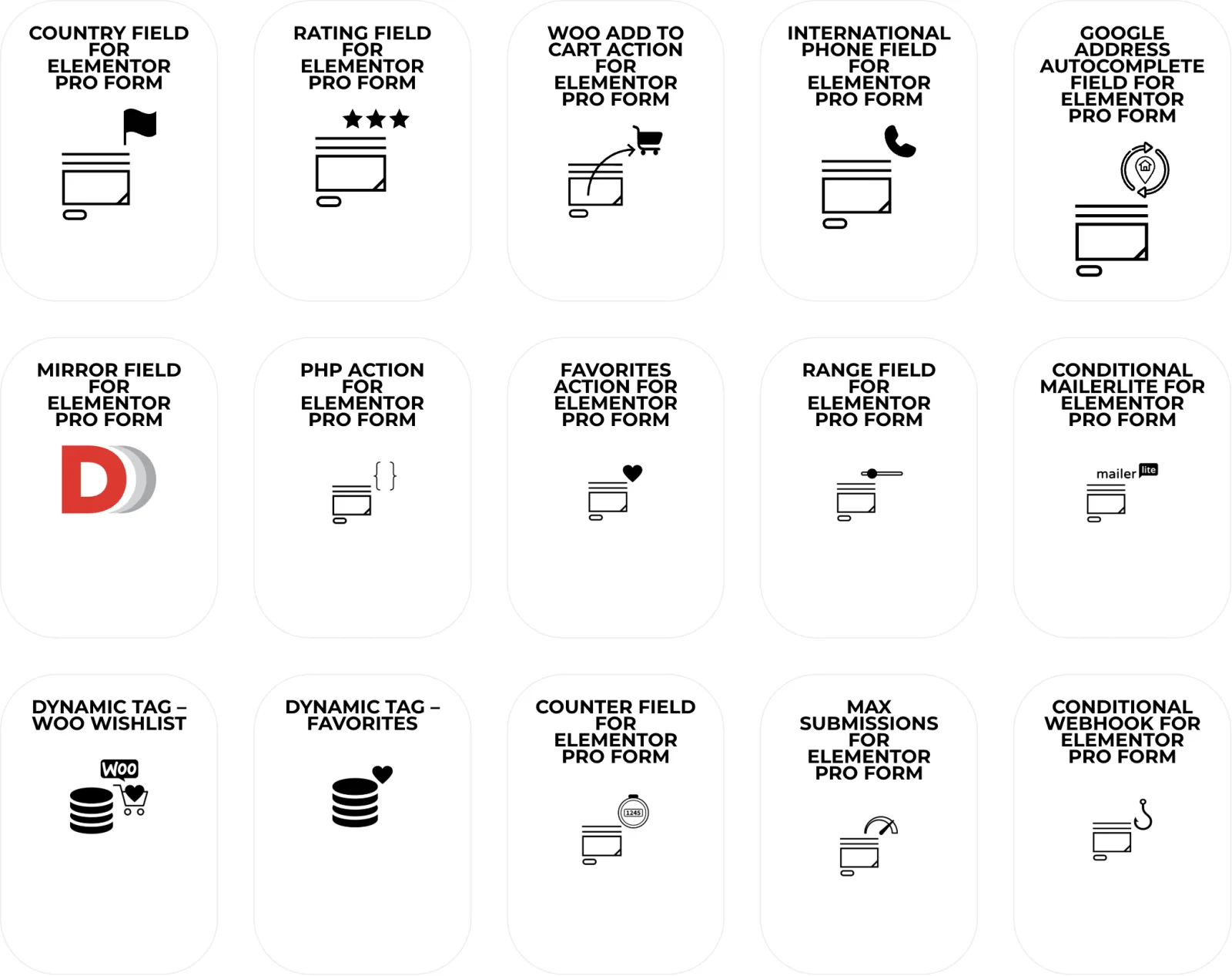
And that is the catch. Around 35 of the plugin's features are named "for Elementor Pro Form", and every one of them extends a widget that exists only in Elementor Pro. The FAQ says you do not need Elementor Pro, and that is true of the data layer described above — but it is not true of the forms suite.
If forms are why you are here, budget Elementor Pro at around $59 a year plus Dynamic Content at €69, so roughly $140 rather than €69. Worth it, in my experience, but not the number on the page. My Elementor Pro review covers whether Pro earns its own keep.
PDF generation
The feature I would miss most if it disappeared, and the one with no real competitor.
You design a layout in Elementor and the PDF generator renders it to a document — portrait or landscape, triggered by a button on any page, or generated automatically from a form submission and emailed out. Combined with the signature field, that is a signed contract produced from a web form.
Invoices, quotes, event tickets, certificates, recipe cards, order confirmations. The alternative is a PHP library and a developer, and this replaces both with a page you can style visually. There is also a PDF Viewer widget for displaying documents inline, with per-device width, height and zoom.
The developer escape hatches
Unusual enough to call out separately, and a large part of why this plugin has the reputation it does among people who build for a living.
Text Editor with Timber runs Twig templates inside a widget. Dynamic Tag PHP and PHP Action let you run your own code as a dynamic value or as a form action. Web Scraper pulls content from external pages. JS Field puts JavaScript in a form.
Very few page-builder add-ons ship a deliberate route to real code. Every agency eventually hits the wall of what a visual builder can express, and the difference between a plugin that gives you a hatch and one that does not is the difference between a solution and a rebuild. If you have ever considered writing your own Elementor addon, this is often the cheaper answer.
The caveat: these are the first features a locked-down managed host will block. Check your hosting before you build on them.
The creative layer, briefly
WebGL image distortion on hover, SVG morphing and distortion, advanced masking, page inertia scroll, scroll effects, cursor tracker, animated off-canvas menu, animated text.
Well built and completely orthogonal to everything above. Nobody should buy this plugin for these. If you already own it they are there, and they are heavy — use them deliberately.
Conditional visibility, which is free
Dynamic Visibility shows or hides any element by user role, login state, date range, day of week, time of day, custom field value, referrer, device, or WooCommerce cart contents, with AND/OR logic and fallback content.
It is also a free plugin on WordPress.org with over 50,000 active installations and a 4.6-star average from 88 ratings, published since July 2018. If conditional display is your only requirement, install that and spend nothing.
The paid version extends it further and integrates with the rest of the suite, but the free plugin is not a crippled demo. It is genuinely the feature, given away.
The staging policy, which is better than anyone advertises
Buried in the documentation and absent from the pricing page: staging sites do not consume a licence seat.
Not just a vague promise — a specific, published list. Staging subdomains of your licensed domain, any subdomain containing dev, development, local, test, staging, stage, stg, backup, wp-staging or wptest, plus the .local, .test, .dev, .staging, .example, .invalid and .backup domain endings, plus localhost, plus raw IP addresses. On top of that, the staging domains of most managed hosts are excluded by name — WP Engine, Kinsta, Cloudways, Flywheel, Pantheon, SiteGround, RunCloud, Closte, BigScoots, Elementor Cloud and others.
For a one-site Starter licence this is a substantial and quiet benefit. It means the €69 tier is genuinely usable in a professional workflow with a real staging environment, which is not true of every competitor at that price. It deserves to be on the pricing page.
Maintenance quality, judged by their own changelog
A plugin with this much surface has an enormous amount to keep working. The release notes are the honest record, and they cut both ways.
The good. Releases land roughly monthly — 3.4.8 through 3.4.13 shipped between June and late August 2026. Compatibility tags for Elementor 4.2.3 and Elementor Pro 4.2.2 arrived within weeks. Recent releases carry unglamorous performance work: reduced database and memory usage when Dynamic Users builds filters, less taxonomy data loaded by Views pagination, less database work for Dynamic Visibility's hierarchy triggers. Someone is profiling, not just shipping widgets. There is accessibility work too — the QR and barcode widget gained proper alternative text.
The documentation is genuinely deep: 261 articles for Dynamic Content alone, 68 for Dynamic Shortcodes, 19 for Dynamic Visibility and 55 step-by-step tutorials. For a plugin this complex, that matters more than the feature count.
The less good.
The August release fixed two PHP 8 fatal errors, one in Dynamic Posts evaluating visibility conditions and one in Views. Fatals in a stable branch mean a white screen for whoever hits them.
Twice this summer a faulty translation caused real damage — once blanking front-end pages in the translated language, once an outright fatal error. If you run non-English sites, that is your risk profile, not a theoretical one.
The plugin was running on PHP 7.3 despite declaring 7.4 as its minimum, unnoticed, until they caught it and set enforcement for 31 August 2026.
And there is a recurring fight with full-page caching. Both the Stripe field and the PDF button broke with nonce verification failures on cached pages, in separate releases. Their own note is explicit that a cache at server or CDN level still needs those pages excluded by hand.
None of this makes it a bad plugin. It makes it a broad one from a small Italian team who ship steadily and document their own mistakes in public, which is rarer than it should be. Expect to meet an edge case eventually.
Performance
The architecture is right: front-end code for a feature only loads if you actually used that feature in the editor. A plugin this size that loaded everything everywhere would be unusable, and some competitors do exactly that.
In practice Dynamic Content rarely shows up as the culprit when you are fixing a slow Elementor site. The usual suspects are stacked animation libraries and unoptimised images.
Three honest caveats from experience. The creative layer is genuinely heavy and you will feel several of those at once. The plugin bundles its own copy of anime.js — the right fix for version conflicts with other plugins, but it can mean two copies of the same library on a page. And legacy Tokens carry a measurable cost, by the vendor's own admission, so an older site may be slower than a new one built the same way.
How it compares
| Dynamic Content | Crocoblock | Elementor Pro alone | |
|---|---|---|---|
| Content architecture (CPTs, relations) | Reads yours | Builds it | No |
| Dynamic output and listings | Excellent | Excellent | Limited |
| ACF depth | Deepest available | Good | Basic |
| Forms logic | Deepest available | Basic | Basic |
| PDF generation | Yes | No | No |
| Templating engine | Dynamic Shortcodes, Twig | No | No |
| Needs Elementor Pro | Forms half only | No | Is Elementor Pro |
| Free staging sites | Yes | No | Yes |
| Single site, per year | €69 | $199 | $59 |
| Agency, per year | €209 for 1000 sites | $199 per site | $199 for 1000 sites |
The Crocoblock comparison comes up constantly, and after years of using both the honest answer is that they are complements more often than alternatives. JetEngine builds the content model — post types, relations, query builders. Dynamic.ooo reads a content model and renders it, wherever that model came from, including from JetEngine. Plenty of my builds run both. My Crocoblock review covers that side, and the pricing breakdown has the licence maths, which favours Dynamic.ooo heavily for agencies.
Against Elementor Pro alone: Pro is the foundation, this is the extension. The question is whether your builds need custom-field output, relationship-driven listings, form logic or documents. If they do, nothing closes that gap as completely.
Pros and cons
What it does well
- The best dynamic-data layer in the Elementor ecosystem — Dynamic Posts with eight query sources, and it runs on free Elementor
- The deepest ACF integration available, including nested Repeaters, Flexible Content and Relationship fields
- Dynamic Shortcodes is a real templating engine with conditions, loops, variables and queries, and it works outside Elementor too
- Search & Filter Pro integration solves faceted search with designed output
- Reads Meta Box, Pods, Toolset and JetEngine rather than competing with them
- The deepest Elementor Pro Form extensions anywhere — conditional logic, calculations, payments, validation
- PDF generation from an Elementor layout, with no real competitor
- Genuine developer escape hatches: Timber and Twig, PHP tags and actions, a JS field
- Staging sites do not consume a licence seat, with a published list of exclusions
- Only loads front-end code for features you actually used
- Enterprise covers 1,000 sites for €209 a year — exceptional agency value
- A genuinely free conditional-visibility plugin with 50,000-plus installs
- 261 documentation articles and 55 tutorials, plus continuous shipping since 2018
What it does badly
- The forms half — a major reason to buy — requires Elementor Pro despite the "no Pro needed" messaging
- Tokens are deprecated, and older sites built on them carry both a performance cost and a migration
- The breadth costs it: recent releases fixed PHP 8 fatals and translation bugs that blanked front-end pages
- Recurring conflicts between full-page caching and the Stripe and PDF features
- An expired licence can prevent you editing what you already built, not just block updates
- The "free trial" is a 24-hour hosted sandbox, not a trial on your own site
- The learning curve is real — the best features are the least discoverable, which is why I ended up making 52 videos
- Prices are in euros and exclude VAT
Who should buy it
Buy it if you build data-driven sites — directories, listings, catalogues, member areas, anything where content lives in custom fields and has to be displayed well. This is the strongest case and the one most reviews undersell.
Buy it if you work in ACF. The Repeater, Flexible Content and Relationship support is better than anything else available, and it will save you writing template files.
Buy it if you build forms that collect structured information or generate documents. Budget for Elementor Pro alongside it.
Buy it if you are an agency running more than three sites. €209 for effectively unlimited sites plus free staging makes the per-project cost trivial.
Skip it if you only want conditional visibility — install the free plugin.
Skip it if you want prettier pages. The creative layer is not worth a subscription on its own.
Think twice if your sites are heavily translated, or if your host blocks arbitrary PHP execution. The first has a documented history of translation bugs; the second removes the developer features that justify the price for technical users.
Frequently asked questions
Five years in, the summary I would give a developer asking whether to buy it: this is a data plugin that markets itself as a widget pack, and the widget count is the least interesting thing about it.
Learn Dynamic Posts and the query sources first. Learn Dynamic Shortcodes second — that is the ceiling, and almost nobody reaches it. The forms and PDF suite is exceptional but it is a separate purchase decision that drags Elementor Pro along with it. And whatever you build, exclude your payment pages from full-page caching and keep the licence alive, because on this plugin an expired licence does not just cost you updates — it can cost you the ability to edit your own pages.
If you want to see the parts that are hard to describe in prose, the 52-video playlist walks through most of them on real builds.
Some links here are affiliate links, at no extra cost to you. Features, licensing terms and release history are as of September 2026, from Dynamic.ooo's documentation and changelog.