Self-hosting n8n on a VPS with Docker usually breaks in one of four places: the firewall, the webhook URL, the encryption key or the backups. None of them fail on day one. They fail the day a webhook won't fire, or the day you restore a backup and every saved credential is unreadable.
n8n's own docs call self-hosting a job for "expert users". Fair. But most of the expertise is knowing those four traps.
Here's one most tutorials skip. Docker's published ports bypass ufw, the firewall Ubuntu ships with. So "I turned on the firewall" can mean nothing at all.
This guide follows n8n's official Docker Compose setup, adds the Postgres database and task runner that n8n's own examples use for production, and closes all four gaps.
I haven't run it on a live server for this post. Every setting comes from n8n's and Docker's documentation. Still choosing where to host? Start with my comparison of n8n hosting providers.
Some links here are affiliate links. They don't change your price or what I recommend.
What do you need to self-host n8n?
You need five things before you type a single command:
- A VPS running a supported Ubuntu release. Docker's install guide lists Ubuntu 22.04 LTS, 24.04 LTS, 26.04 LTS and 26.10 as of 18 October 2026.
- A domain where you can add a DNS record. n8n will live on a subdomain such as n8n.yourdomain.com.
- SSH access to the server and basic comfort in a terminal.
- A password manager, because this setup creates a handful of secrets you can't afford to lose.
- Somewhere off the server to keep backups.
That last one matters more than the VPS. You can rebuild a server. You can't rebuild an encryption key you never saved.
Skip self-hosting if you've never used SSH. n8n itself says that if you aren't experienced at managing servers, you should use n8n Cloud instead. I compare what each route costs in my n8n pricing breakdown of cloud vs self-hosted.
Not sure what you're renting? My guide to what a VPS is explains root access and managed vs unmanaged plans.
How much VPS does n8n need?
n8n doesn't publish a single RAM minimum for n8n alone. Its Hetzner guide says the provider's smallest CPX11 type "is enough" for most usage levels. It asks for at least 4 GB of RAM and 2 vCPUs once you add the sandbox that powers n8n Assistant.
Usage decides the rest. n8n's memory docs name the big consumers: large JSON payloads, binary files, the Code node, manual test runs and several workflows running at once. When n8n runs out, you see errors like "Connection Lost" or "JavaScript heap out of memory".
I recommend Hostinger's KVM VPS for self-hosting tools like n8n. Here's how its four plans map to n8n workloads, with prices from Hostinger's VPS page on 18 October 2026:
| Plan | vCPU / RAM / NVMe | Intro price | Renews at | Good fit for |
|---|---|---|---|---|
| KVM 1 | 1 / 4 GB / 50 GB | $6.49/mo | $11.99/mo | Solo use, light scheduled workflows |
| KVM 2 | 2 / 8 GB / 100 GB | $8.99/mo | $14.99/mo | This guide's full stack, plus room for n8n Assistant |
| KVM 4 | 4 / 16 GB / 200 GB | $12.99/mo | $28.99/mo | Many busy workflows, big files, several users |
| KVM 8 | 8 / 32 GB / 400 GB | $25.99/mo | $49.99/mo | Heavy AI and data workloads |
The intro prices apply to a two-year term paid upfront, and the renewal price is what you pay after that. Every plan includes free weekly backups and a managed network firewall, and both come up again in this guide.
My take: KVM 2. It clears n8n's 4 GB and 2 vCPU line for the Assistant sandbox, and Hostinger's own FAQ calls KVM 2 enough for medium-scale apps like n8n. KVM 1 has a single vCPU, so it falls short of that line. My Hostinger review covers the company's support and renewal pricing in more detail.
How does a self-hosted n8n setup fit together?
Four pieces sit between a visitor and your workflows, and only one of them faces the internet.
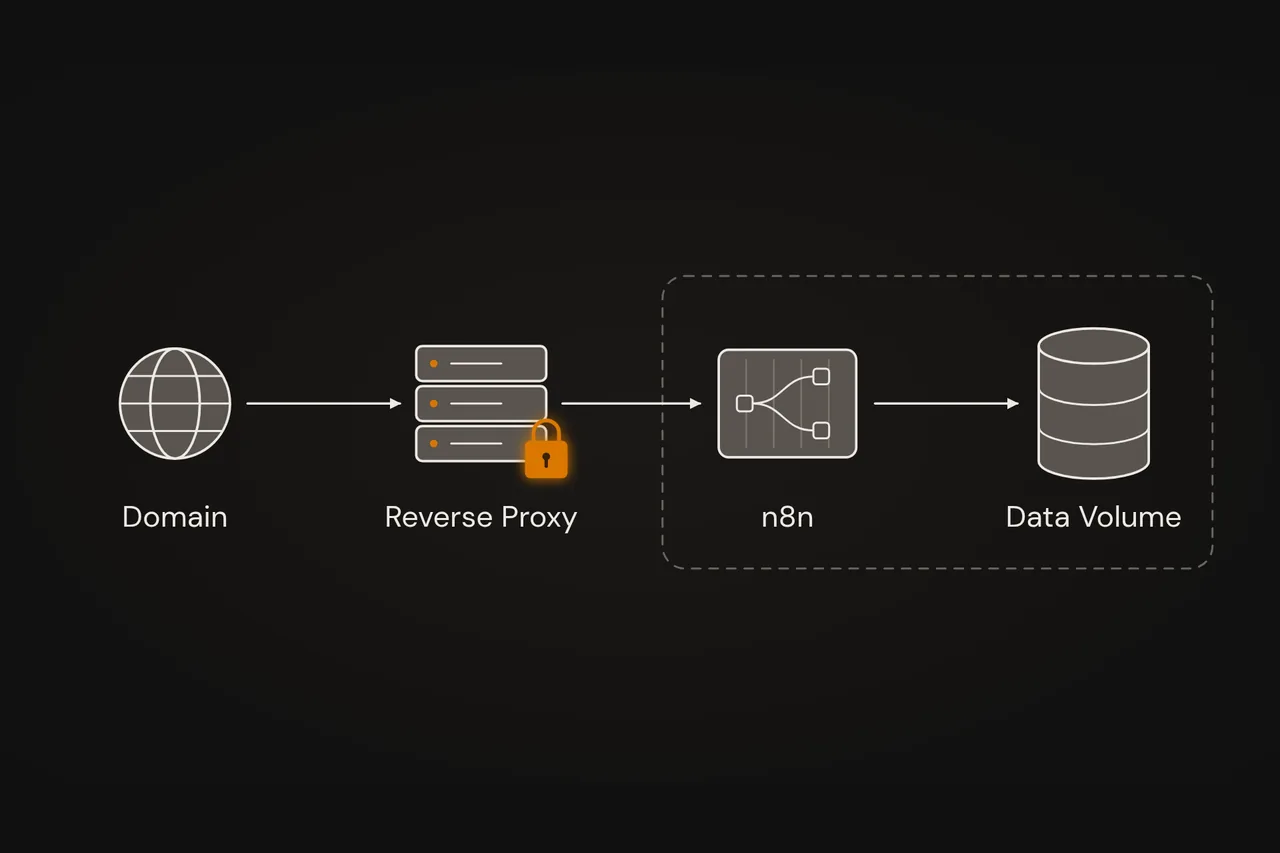
- Domain: an A record points n8n.yourdomain.com at your server's IP address.
- Reverse proxy: Traefik listens on ports 80 and 443, gets a free Let's Encrypt certificate and renews it. n8n's SSL docs call a reverse proxy the recommended way to add HTTPS.
- The n8n container: the editor and workflow engine, plus a task runner container that executes Code node scripts, and a Postgres container that stores workflows and execution history.
- Data volumes: Docker volumes that survive restarts and updates. The n8n_data volume holds the encryption key, and db_storage holds the database.
n8n listens on port 5678, but in this setup that port is bound to 127.0.0.1. Only Traefik can reach it. Postgres and the task runner publish no ports at all.
That design is the answer to the ufw problem, and I'll come back to it in Step 1.
SQLite or Postgres: which database should you use?
Out of the box, self-hosted n8n stores everything in a SQLite file inside the n8n_data volume. That's fine to start, but n8n's docs are direct about production.
| Question | SQLite | Postgres |
|---|---|---|
| Is it the default? | Yes, a file at ~/.n8n/database.sqlite | No, you set DB_TYPE=postgresdb |
| Extra container | None | One postgres:18 container |
| n8n's guidance | Fine for trying things out | Production with more than a handful of users or round-the-clock workflows |
| Backup method | Stop n8n, then copy the .n8n folder | pg_dump, plus the .n8n folder for the key |
| Switching later | Existing data doesn't move over automatically | Not needed |
n8n supports Postgres 17 and 18, plus 16 for compatibility, according to its database page.
If this is the instance you'll rely on, start on Postgres. Moving from SQLite later means exporting and re-importing workflows and credentials, and users and execution history don't come along.
How to self-host n8n on a VPS with Docker, step by step
The whole job breaks into five stages, and each one below is a step.
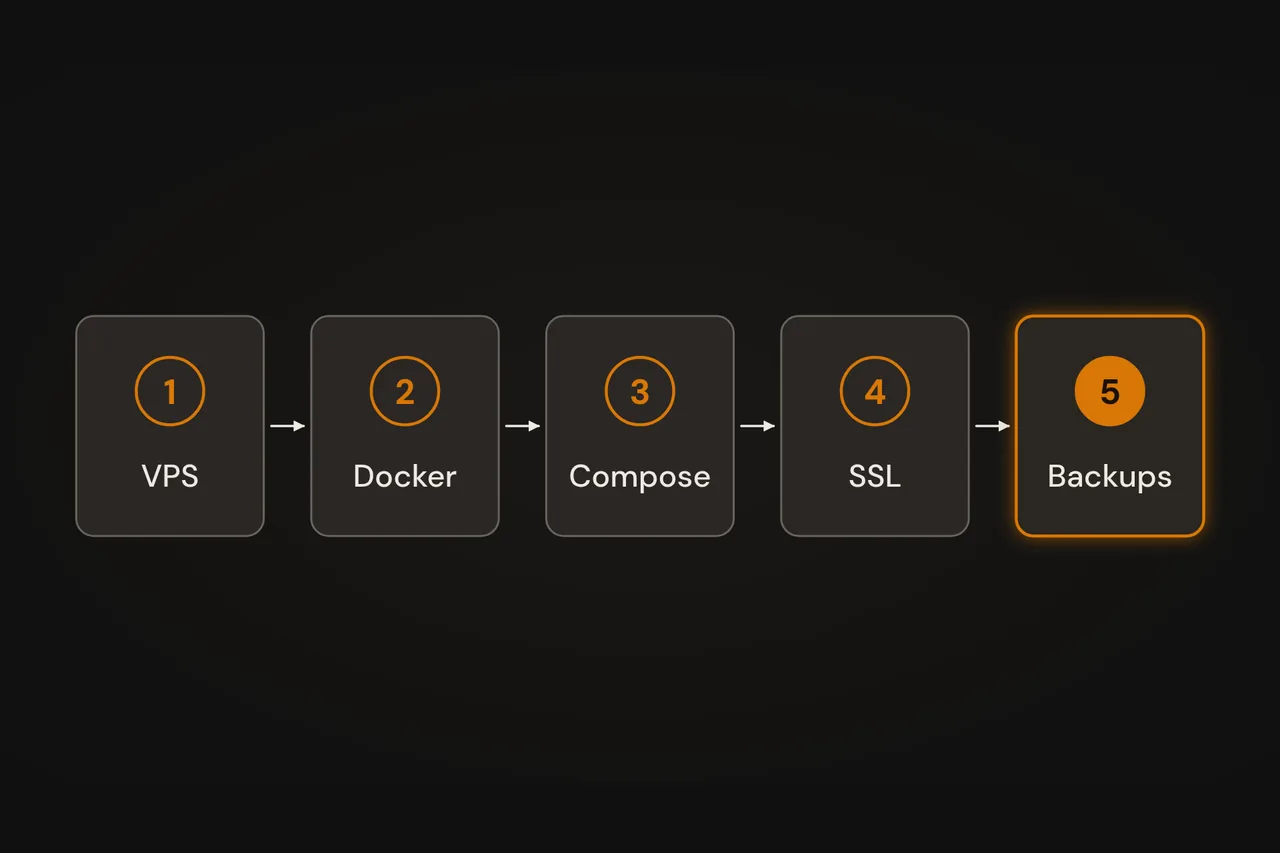
Step 1: Prepare the VPS with a DNS record and a firewall
First, point your subdomain at the server. In your DNS provider, add one record:
| Record type | Name | Value |
|---|---|---|
| A | n8n | your server's public IPv4 address |
Do this first. Traefik can only get a certificate after the name resolves to your server, and DNS changes can take a while to spread.
Next, the firewall. On Ubuntu, allow SSH, HTTP and HTTPS in ufw, then switch it on:
Now the catch. Docker's documentation warns that when you publish a container port, "these ports bypass your firewall rules". Docker routes that traffic before ufw ever sees it.
So ufw alone won't protect a port that Docker publishes. This guide handles that in two ways. n8n's port is bound to 127.0.0.1, and Postgres isn't published at all.
For a second layer, use the network firewall in your VPS panel. Hostinger's managed VPS firewall filters packets before they reach the server, so Docker can't route around it.
Step 2: Install Docker Engine and Docker Compose
n8n's server guide points to Docker's own install docs. Use Docker's apt repository method: Docker says its convenience script isn't recommended for production. If you want each command explained, plus the post-install settings that matter on a VPS, my step-by-step guide to installing Docker on Ubuntu covers them.
Remove any distro-packaged Docker first, then add Docker's repository. These commands come from Docker's Ubuntu guide:
Then install Docker Engine with the Compose plugin and check both:
You can add your user to the docker group to skip sudo. Know what that means first: Docker's docs say the docker group "grants root-level privileges to the user".
Prefer clicks to commands? Hostinger offers ready-made n8n and Docker with Traefik templates when you set up a VPS. The manual route here shows you every setting, which is what you need on the day something breaks.
Step 3: Write the .env and docker-compose.yml files
Create a project folder, a folder for files n8n can read and write, and the small Postgres init script from n8n's withPostgres example. The script creates a separate, non-superuser account for n8n.
Generate four long random secrets, one for each password or token below:
Now create the .env file. Docker Compose reads it automatically from the project folder.
Lock the file down with chmod 600 .env, and save a copy of every value in your password manager.
Next, the Compose file. It combines n8n's official Docker Compose server setup for Traefik and SSL with the Postgres and task runner services from n8n's withPostgres example. Save it as docker-compose.yml:
The file passes Docker Compose's config check. Here's what I changed from n8n's server example, and why:
- Postgres with a non-root user, taken from withPostgres. The PGDATA line stays: n8n warns that without it, Postgres 18 writes outside the volume and your database starts empty.
- An external task runner. n8n's task runner docs say internal mode is "insecure by design" and tell you to use external mode in production. Without it, anyone who can edit a workflow could potentially read your credentials and encryption key.
- N8N_PROXY_HOPS=1, which n8n's reverse proxy docs ask for whenever n8n sits behind a proxy.
- N8N_ENCRYPTION_KEY set from day one, so the key lives in your password manager as well as in the volume.
- A pinned N8N_VERSION, so an update happens when you decide, not when the image changes. The runner image uses the same variable, because n8n requires the two versions to match.
- No Traefik dashboard. n8n's example turns on Traefik's insecure API flag, and this setup doesn't need it.
Three settings deserve a closer look. N8N_WEBHOOK_URL is the public base URL n8n gives to services that call your webhooks. It replaces the older WEBHOOK_URL, which n8n deprecated in version 2.35.0, though many tutorials still use it.
GENERIC_TIMEZONE controls when Schedule Trigger nodes fire, and it defaults to America/New_York. N8N_RUNNERS_ENABLED isn't in the file on purpose: n8n says you no longer need it from version 2.0.
Step 4: Start n8n and let Traefik fetch the SSL certificate
From the n8n-compose folder, start the stack and check that all four containers are running:
The health check is from n8n's Compose guide. It only works on the server itself, which proves the 127.0.0.1 binding is doing its job.
Now open https://n8n.yourdomain.com. If the certificate isn't ready yet, give Traefik a moment and reload. Create the owner account with a long password, then turn on two-factor authentication under Settings, then Personal.
No padlock, or a certificate warning? Check three things in order: the A record resolves to the right IP, port 443 is open in both firewalls, and sudo docker compose logs traefik shows no errors.
Prefer Caddy to Traefik? n8n's Hetzner guide uses Caddy instead, with a caddy service in place of the traefik one (n8n keeps the files in its n8n-docker-caddy repository). The whole proxy configuration is one Caddyfile, and Caddy also handles the certificate:
Use one proxy or the other, never both. They both want ports 80 and 443.
Step 5: Back up n8n data off-site
A complete n8n backup, per n8n's backup and restore docs, has two parts. The first is the .n8n folder, which holds the config file with the encryption key. The second is your Postgres database.
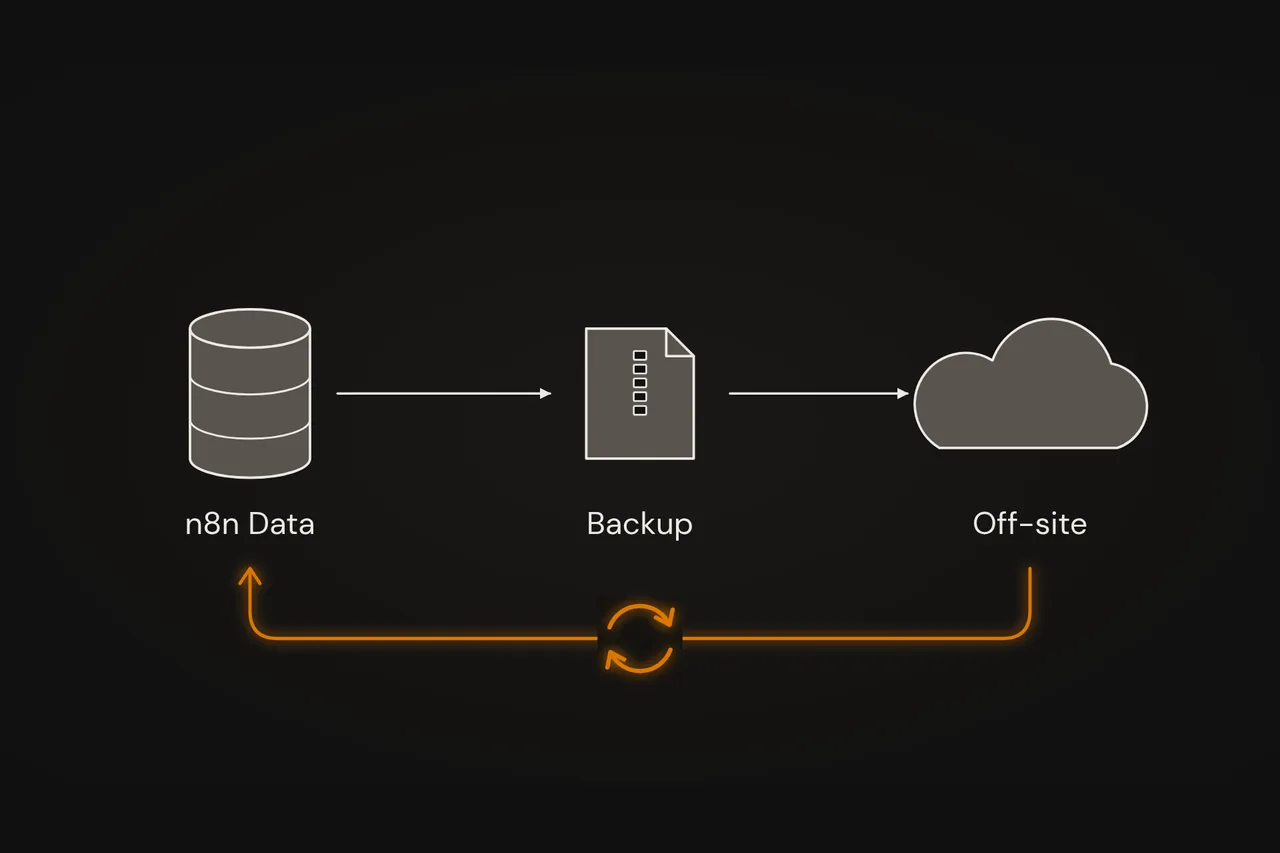
The n8n CLI exports are useful, but they aren't a full backup. n8n says they leave out users and roles, execution history, variables and instance settings, including the encryption key.
This script covers all three layers. Save it as backup.sh in the n8n-compose folder:
The JSON exports go inside the n8n_data volume on purpose. n8n warns that a backups folder elsewhere in the container isn't persisted, and the volume archive in part 3 picks them up anyway.
The volume name comes from the project folder, so n8n-compose gives n8n-compose_n8n_data. Run sudo docker volume ls to confirm yours.
Make the script executable and schedule it with cron. Replace the path with your own:
Then get the files off the server. rclone can copy the backups folder to any S3-compatible bucket, and rsync can copy it to another machine you control. Hostinger's free weekly VPS backups are a good second layer, but weekly is too slow to be your only copy.
Store the .env file separately and encrypted. With it and last night's backup, a restore follows n8n's order:
- Stop n8n with sudo docker compose down. Never add -v, because that deletes the volumes, including the one with your encryption key.
- Restore the n8n_data volume from n8n_data.tar.gz.
- Start only Postgres with sudo docker compose up -d postgres, then load the dump with psql.
- Put your .env back, including the same N8N_ENCRYPTION_KEY.
- Start everything with sudo docker compose up -d.
Test this once on a spare VPS before you need it. An untested backup is a hope, not a backup.
How do you update self-hosted n8n safely?
n8n ships a new minor version most weeks. Its docs ask you to update at least once a month, so you never have to jump several versions at once.
Use the stable release in production. The beta channel gets the newest features first, and n8n warns it may be unstable.
Before each update, run backup.sh and read the n8n release notes for breaking changes. Then change N8N_VERSION in .env and run the update sequence from n8n's Docker docs:
Because the runner image reads the same N8N_VERSION, n8n and its task runner move together.
Leave the postgres:18 tag alone during routine updates. A new Postgres major version can't open data written by an older one, and n8n's withPostgres notes walk through the dump and restore that a major upgrade needs.
Which security settings matter most?
Security on a self-hosted instance comes down to a handful of settings. This is the short list I'd check on any new instance:
- Keep the encryption key in two places, the n8n_data volume and your password manager. Lose it and every saved credential is unreadable.
- Publish only ports 80 and 443. Keep 5678 bound to 127.0.0.1, never publish Postgres, and back ufw with your provider's network firewall.
- Run the external task runner, as in this guide. n8n says task runners are the only isolation layer between Code node scripts and your instance.
- Turn on 2FA for the owner account, and give other people their own accounts instead of sharing yours.
- Keep N8N_RESTRICT_FILE_ACCESS_TO=/files, so file nodes can only touch the local-files folder.
- Treat the docker group as root, and use SSH keys rather than passwords for server logins.
- Run n8n's built-in security audit after setup and every so often after that. It reports risks in five areas: credentials, database, file system, nodes and instance settings.
What usually goes wrong, and how do you fix it?
These are the five problems this setup is most likely to hit, with the fix for each:
- Webhook URLs show localhost:5678. N8N_WEBHOOK_URL is missing or wrong. Set it to your https URL with a trailing slash, keep N8N_PROXY_HOPS=1, then run sudo docker compose up -d. If webhooks are new to you, my guide to how webhooks work explains test vs production URLs.
- No certificate, or a browser warning. DNS isn't pointing at the server yet, or port 443 is blocked in one of your two firewalls.
- Schedules fire at the wrong hour. GENERIC_TIMEZONE is unset, so n8n uses America/New_York.
- "Connection Lost" or a 503 in the middle of a run. The workflow ran out of memory. n8n's fix is to process data in smaller batches, for example 200 rows at a time instead of 10,000, or to move to a bigger plan.
- Credentials won't decrypt after a restore. The encryption key in .env doesn't match the one the data was saved with.
Is self-hosting n8n worth it?
For most people who can handle a server, yes. n8n says you can run the free Community edition indefinitely, so your bill is the VPS plus your time.
The Community edition does leave out some team features, such as SSO, sharing workflows and credentials, and Git-based version control. Those need a paid Business or Enterprise license, as n8n's editions page explains.
The real cost is attention. You own the updates, the backups and the 2 a.m. "why is the webhook down" moments.
If you'd rather not, n8n Cloud removes all of that for a monthly fee. If you do go self-hosted, my list of n8n workflow examples is a good place to find your first automations. Want an AI assistant on the same server? Here's how to build an AI agent in n8n, step by step.
Frequently asked questions
Running n8n for yourself or a small team? Start on a 2 vCPU, 8 GB server with Postgres and the external runner from day one, because changing databases later is the painful part. Then set up backup.sh before you build your first workflow.