Webflow vs WordPress is a choice you'll live with for years, because switching platforms later means rebuilding the site.
On list prices, one small-business site costs $900 over three years on Webflow Premium. On self-hosted WordPress, the same site costs $285 to $897, by my arithmetic.
That range hides the catch. The low end assumes you do the upkeep yourself. The high end pays a managed host to take most of it, and lands $3 below Webflow.
So price won't settle this. For most small businesses, one question does, and I'll put it to you in the verdict.
I build WordPress sites for clients (more than 150 websites so far) and review tools like Webflow, so you should know where my bias starts. Prices and limits are as of 21 and 24 September 2026, except hosting prices, which come from my own hosting posts, last updated in May and June 2026.
Some links here are affiliate links, disclosed in full at the end.
Webflow vs WordPress at a glance
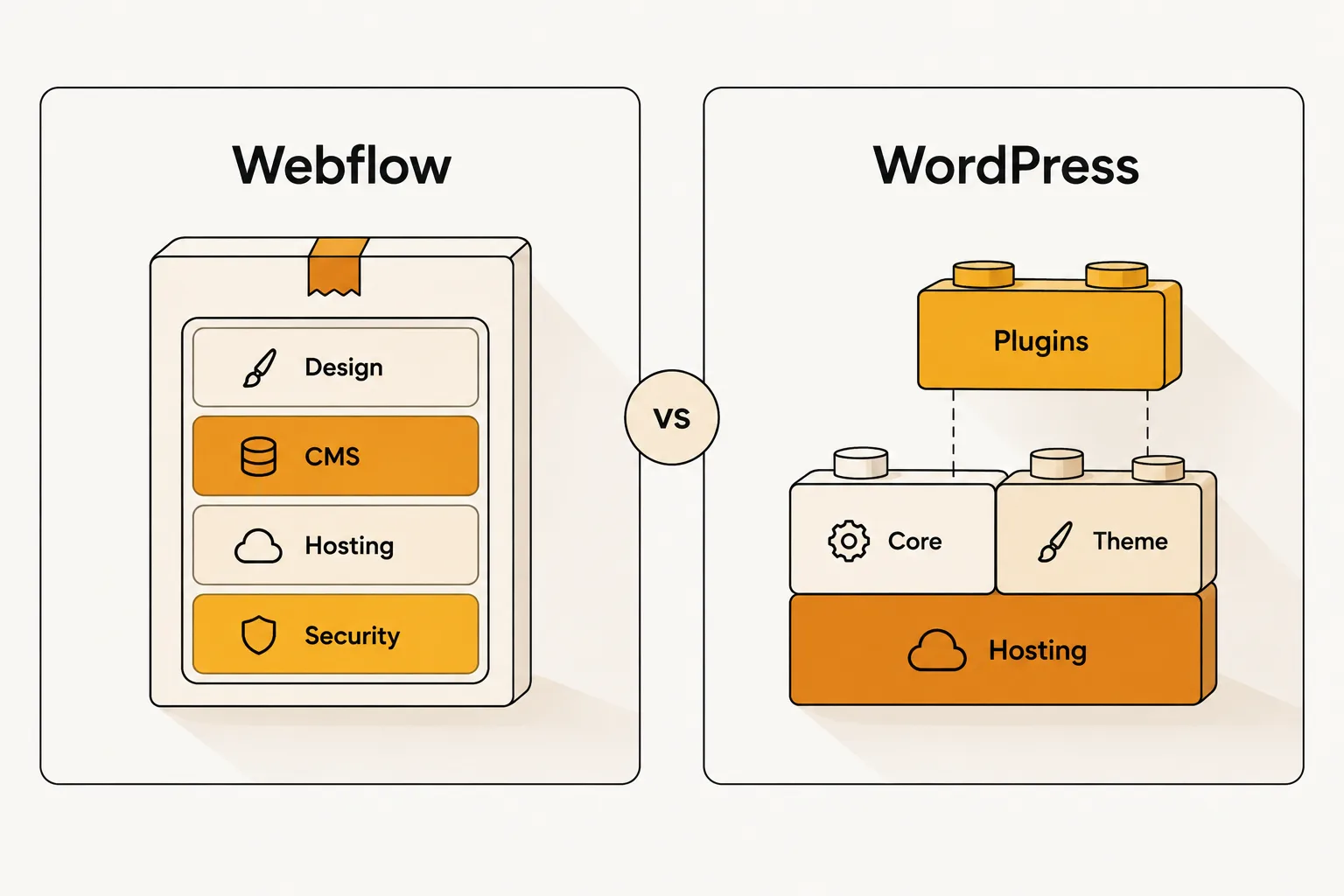
Webflow sells one subscription that covers a visual designer, a CMS and hosting. According to W3Techs on 24 September 2026, it runs 0.8% of all websites.
WordPress is free, open-source software that you install on hosting you pick, then extend with themes and plugins. It runs 40.2% of all websites, about 50 times Webflow's share.
| Webflow | WordPress (self-hosted) | |
|---|---|---|
| What you pay for | One plan covering designer, CMS and hosting | Hosting, plus any premium themes or plugins |
| Site with a blog | Premium, $25/mo billed yearly or $39 monthly | Hostinger from about $2.99/mo intro, renewing near $11.99 |
| Who patches and backs up | Webflow | You, or a managed host |
| Design | Visual designer built on HTML and CSS ideas | Themes, the block editor or a page builder |
| Content limits | 20,000 CMS items and 40 Collections on Premium | No platform cap; your host sets the limits |
| Add-ons | 411 apps in the Webflow Apps marketplace | 69,306 plugins in the WordPress.org directory |
| Online store | Ecommerce plans from $29/mo billed yearly | WooCommerce plugin |
| Leaving | Code export on paid Workspace plans, without CMS content | Your files and database move with you |
| Extra languages | Localize, from $9 a month per language | A multilingual plugin |
Webflow's plan prices date from 21 September 2026, the other figures from 24 September, and hosting from mid-2026. For every Webflow plan and add-on, see my full breakdown of Webflow pricing.
What does one site cost over three years?
Let's price one small-business site with a blog, one language and no store, inside Premium's 50 GB of monthly bandwidth. The domain is left out of both sides, since you pay for one either way.
On WordPress I've added the Essential plan of Elementor Pro, $59 a year as of 21 September 2026, because a page builder is the closest match to Webflow's designer.
Hosting prices come from my roundup of affordable WordPress hosts, last updated in May 2026. The budget case uses Hostinger, with its renewal price from my June 2026 review, and the hands-off case uses WP Engine's managed plan.
Hostinger's $2.99 rate needs a long prepaid term, often 48 months, so you'd pay about $144 on day one. Renewal costs about four times as much, which is why I priced both.
The gap that matters sits between the first and last WordPress totals: $612 over three years, or $17 a month. That's the price of handing core updates, backups and caching to a managed host like WP Engine.
Pay it, and WordPress costs $3 less than Webflow. Skip it, and you save $615, paid for in your own time.
The Webflow costs you don't choose
Webflow's bill can grow on its own. Stay over Premium's 50 GB for two months running and Webflow upgrades your bandwidth automatically, taking the plan from $25 to $45 a month billed yearly at 100 GB.
Add-ons stack on top of that: billed yearly, Analyze starts at $9 a month, and each extra language on Localize Essential costs another $9.
No blog? Webflow Basic has no CMS and comes to $540 over three years billed yearly, which is the fair match for a brochure site.
My take: for one site, the money is too close to decide anything. The multiplier is where it tips. Ten Webflow Premium sites cost $250 a month billed yearly, while Hostinger's entry plan allows up to 100 websites (though a multi-site Elementor licence costs more).
Can you leave Webflow and take your site with you?
Partly. Webflow's code export hands you the front end, but not the parts that make it a working site.
It also needs a paid Workspace plan, from $16 a month billed yearly on Freelancer; the free Starter Workspace can't export at all. Here's what goes and what stays, according to Webflow's help centre:
| Part of the site | In the code export? |
|---|---|
| Static pages (HTML) | Yes |
| Styles (CSS) | Yes, with Webflow's base stylesheets |
| Interactions, navbars, sliders and tabs | Yes, through the exported JavaScript |
| Images | Yes |
| CMS content | No; Collection lists show their empty state |
| Ecommerce products and checkout | No |
| Form submissions and reCAPTCHA | No |
| Site search and password protection | No |
| User Accounts and code components | No |
| Other languages | No; primary locale only |
Your data isn't trapped, since CMS Collections, Ecommerce Collections and User Accounts export as CSV files. But a CSV is rows, not a website. Moving a Webflow blog to WordPress means importing those rows and rebuilding every template around them.
Self-hosted WordPress works the other way. The files and database are yours, so moving hosts is a migration rather than a rebuild, and most hosts in my roundup offer free migration or a plugin for it.
WordPress has its own lock-in, though, because content built with Elementor's widgets is tied to Elementor. Leaving the builder means rebuilding those sections.
And if you outgrow the front end, WordPress can keep your content while a new framework displays it, as my guide to moving WordPress to Next.js shows.
What happens if you want out in year three? On WordPress, you change hosts. On Webflow, you plan a rebuild, and if your content is the business, that alone may decide it.
Is Webflow easier to design with than WordPress?
Webflow gives you more control over the design, and charges for it in learning time.
Its designer is a visual layer over HTML and CSS. You work with classes, boxes, flexbox and grid, and what you draw closely matches the code Webflow publishes.
That precision is why designers like it, and why beginners who have never met a CSS class tend to stall in their first few sessions.
Motion is Webflow's other edge. It bought GSAP, the animation library, in autumn 2024, and its Interactions with GSAP feature builds reusable animations on a visual timeline.
Here's the catch for that pitch. Since 30 April 2025, GSAP has been free for everyone, commercial use included, so a WordPress developer can load the same library. Webflow's real advantage is the timeline, not the library.
On WordPress you choose between a block theme, a page builder or custom code. Elementor, the builder I make tutorials on, is the closest thing to Webflow's designer, and my Elementor Pro review covers what the paid version adds.
Page builders are quicker to learn, but they trade away some precision and will happily let you build a slow, over-nested page.
Who's building the site, you or a designer? If they think in layouts and CSS, Webflow repays the learning time. If they think in pages and content, a WordPress page builder gets them live sooner.
If design freedom is the main draw, my Framer vs Webflow comparison covers the other design-first builder worth a look.
Can Webflow's CMS handle as much content as WordPress?
For a normal blog, yes. For a content-heavy site, Webflow's limits arrive sooner than you'd expect.
Premium holds 20,000 CMS items across 40 Collections. A Collection is a content type, such as posts, authors or case studies, and the item limit covers the whole site.
A blog posting once a day would take about 55 years to reach 20,000 items, by my arithmetic. So posts aren't the problem; structure is.
Each Collection holds up to 60 fields, according to Webflow's API docs, and up to ten reference fields depending on plan. A directory or a large resource library can hit those limits long before the item cap, and the jump to 100 Collections comes with Team at $2,500 a month.
Publishing at volume from another system is possible, since Webflow's Data API can create, update and publish items. Premium allows 120 requests a minute, and Team raises that to 600.
WordPress has no platform cap on posts, pages or content types, because your host's database and server set the limits. Custom content types and fields come from code, or from plugins such as JetEngine in the Crocoblock suite.
How many content types does your site need, and how do they connect? If the answer is a blog and a portfolio, Webflow's CMS is a pleasant place to write. If it's ten types that point at each other, I'd build on WordPress.
WooCommerce or Webflow Ecommerce: which suits your store?
Webflow sells stores their own plans, which its May 2026 pricing changes left alone:
| Webflow Ecommerce plan | Billed yearly | Billed monthly | Items | Staff accounts | Transaction fee |
|---|---|---|---|---|---|
| Standard | $29/mo | $42/mo | 500 | 3 | 2% |
| Plus | $74/mo | $84/mo | 5,000 | 10 | 0% |
| Advanced | $212/mo | $235/mo | 15,000 | 15 | 0% |
The item count covers products, variants and categories, so a catalogue with many sizes and colours fills it faster than its product list suggests.
Standard's 2% fee comes on top of Stripe or PayPal fees. By my arithmetic, Plus becomes the cheaper plan once a store sells more than about $2,250 a month, billed yearly. And remember the export table: products and checkout don't leave with the code.
WooCommerce is a free plugin that turns WordPress into a store. It sets no item limit and takes no cut of your sales, though your payment processor still charges its fees.
What you pay for instead is hosting and maintenance. My roundup points growing stores to managed cloud hosting like Cloudways, from about $11 a month in May 2026. Features such as subscriptions or bookings are often paid extensions, and each one is another plugin to patch.
How many products and variants will you sell in two years? A design-led shop that fits inside Standard's 500 items suits Webflow well. Past that, Plus costs $74 a month billed yearly, and WooCommerce becomes the better long-term home, especially if you need custom checkout rules.
Is Webflow or WordPress better for SEO and speed?
Neither platform ranks a page on its own, because content and links do that. What differs is how much work the technical basics take.
Webflow builds in page titles, meta descriptions, an automatic sitemap and redirects. It also runs the hosting and the CDN, the network that serves pages from servers near each visitor, so there's no server for you to misconfigure.
WordPress needs an SEO plugin for most of the same controls, and its speed is whatever your host, theme and plugins make it. That's why my WordPress performance checklist starts with hosting, before caching and images.
The upside is control: on WordPress you can fix anything that slows a page, from the server to the last script, while on Webflow you work within its hosting.
Languages are Webflow's strongest SEO card
Webflow Localize is priced per language, per site. Essential costs $9 a month per language billed yearly, for up to three, and gives each language a folder such as /es/ with its own SEO titles.
It also adds hreflang tags to the sitemap, which tell search engines which language each page is in. Translated URLs need Advanced, at $29 a month per language billed yearly, for up to ten.
Two extra languages on Advanced add $2,088 over three years to the site plan, by my arithmetic, and $648 on Essential. On WordPress a multilingual plugin does the same job, and the result depends on which one you choose.
For a one-language site, I'd call SEO a tie, with speed going to whoever looks after the hosting better. For several languages and no developer, Webflow's setup is tidier, and you pay for that tidiness every month.
Is WordPress less secure than Webflow?
WordPress core is rarely the problem. Plugins are.
Patchstack's State of WordPress Security in 2026 report counted 11,334 new vulnerabilities in the WordPress ecosystem during 2025, up 42% on 2024. That's about 31 a day.
Where they were found matters more: 91% in plugins, 9% in themes, and six in WordPress core. Six, out of more than eleven thousand.
The pace is the other problem. Patchstack found that 46% weren't fixed by the time they were made public, and heavily exploited ones reached mass exploitation in a median of five hours. The hosting defences it tested blocked only 26% of exploit attempts.
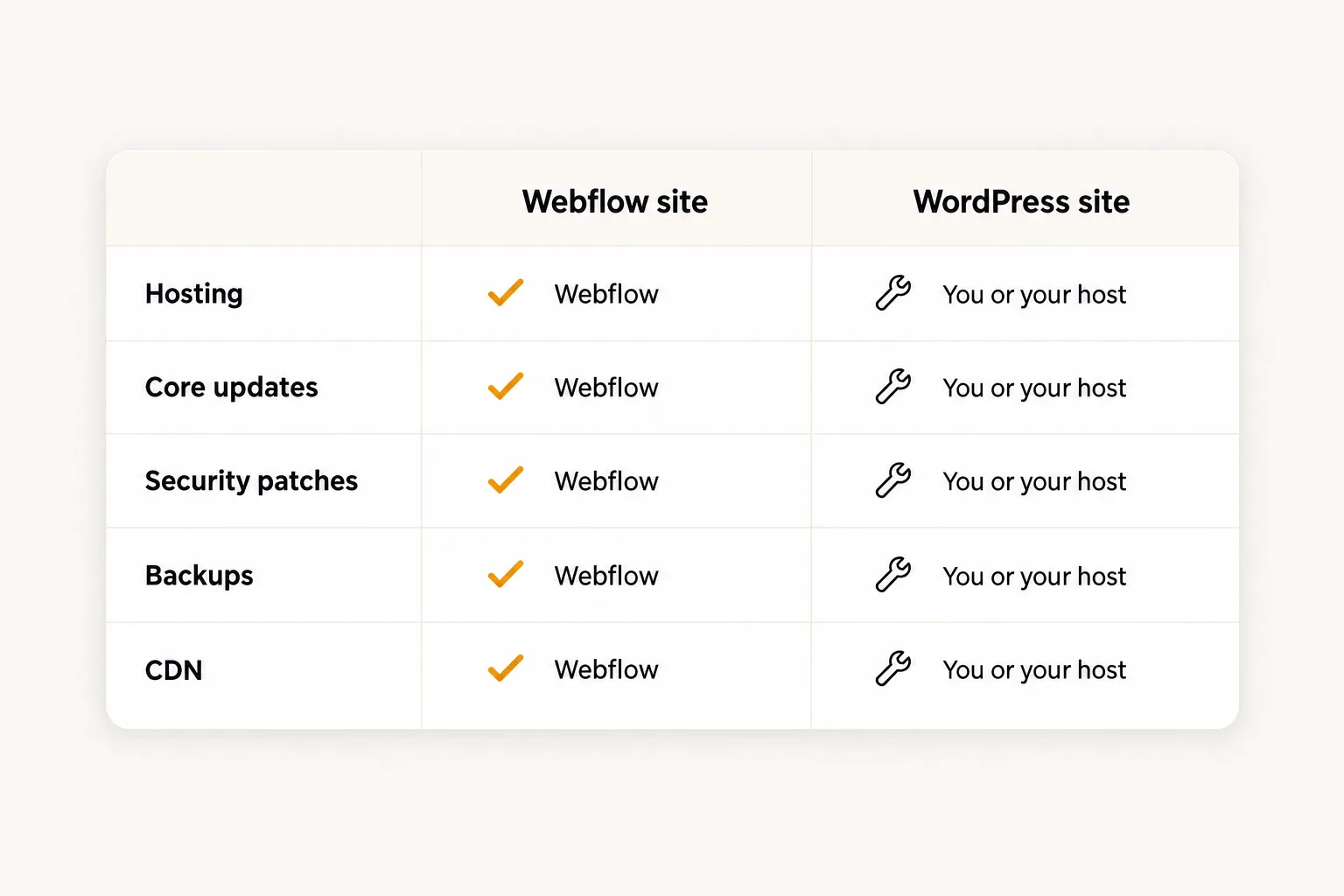
On Webflow, none of that is your job. Webflow hosts the site, patches the platform, keeps backups and runs the CDN, and there's no plugin for you to leave outdated.
On WordPress, each of those rows is a task. WordPress 7.1.2 shipped on 22 September 2026, with a 7.0.6 security backport the same day, and minor releases like that can install themselves if automatic updates are on. Plugin and theme updates, checks after each one and off-site backups still fall to you or your host.
So is WordPress less secure? Out of the box, no. Left alone, yes, and that's the difference that matters.
My rule is that every plugin has to earn its place, because each one is someone else's code that you now keep patched. My WordPress security checklist covers the rest in order of impact.
Put a name next to each step before launch. If you can't, remember that when you reach the verdict.
Does WordPress's plugin library beat Webflow Apps?
On numbers, it isn't close. The WordPress.org directory listed 69,306 plugins on 24 September 2026, while Webflow's Apps marketplace listed 411, so there are about 169 plugins for every app.
Webflow's apps cover the common jobs across more than 20 categories, from SEO to ecommerce and AI. For the rest you have the Data API, custom code embeds, and DevLink, which syncs Webflow components with a React codebase.
Every Webflow site plan, the free one included, also comes with an MCP server, which lets AI assistants such as Claude or Cursor work on your site directly.
The plugin count cuts both ways, since 91% of those vulnerabilities came from plugins, and every one you add is another update to track.
Which integrations can't your business run without? List them before you choose. On Webflow, check that each one is in the marketplace or has an API you can connect. On WordPress, check when each plugin was last updated, and never install nulled (pirated) copies.
Which is easier to hand over to a client or a team?
For a client who only edits text, images and blog posts, Webflow is the easier handover. There's no plugin to update and no server for them to break.
Seats cost extra, though: in a Webflow Workspace, a full seat costs $39 a month and a limited seat $15, billed yearly, while reviewer seats are free.
Team features cost far more, because publishing workflows, page branching and an activity log sit on the Team plan at $2,500 a month, on an annual contract. The Growth Workspace, at $49 a month billed yearly, adds site-level roles and publishing permissions, but not workflows.
WordPress has roles such as Editor and Author built in, and a client can own the hosting account outright. What's harder is everything around it: licences to transfer, plugins to update and someone to call when an update breaks a page.
My guide to handing over Elementor sites to clients covers the licences, documents and care plan that make a WordPress handover stick.
Will your client ever pay someone to maintain the site? If not, hand them Webflow. If they'll pay for a care plan, or have someone in-house, WordPress gives them more room to grow.
Where each one falls short
Where Webflow falls short
- Per-site pricing adds up: ten Premium sites cost $250 a month billed yearly, with no volume discount.
- Nothing self-serve sits between Premium at $25 and Team at $2,500 a month.
- Stay over your bandwidth tier for two months and Webflow upgrades you, with no refund.
- Code export needs a paid Workspace plan and leaves CMS content, ecommerce and forms behind.
- Every extra language is a monthly bill for as long as the site runs.
Skip Webflow if you run many small client sites on thin margins, need a large or complex store, or want to own every file your site runs on.
Where WordPress falls short
- Maintenance never ends: 11,334 new vulnerabilities in 2025, and the most exploited ones were hit at scale within hours.
- Cheap hosting renews high: Hostinger's intro rate roughly quadruples at renewal, on June 2026 prices.
- Quality varies across 69,306 plugins and 8,652 themes, and vetting them is your job.
- Page builders lock content in, so leaving Elementor means rebuilding those sections.
- The project's governance has been noisy: WP Engine's lawsuit against Automattic was still unsettled in September 2026, with a jury trial reportedly set for September 2027.
Skip WordPress if nobody will own updates after launch, or if you want one bill and one support desk for everything.
Webflow or WordPress: which should you pick?
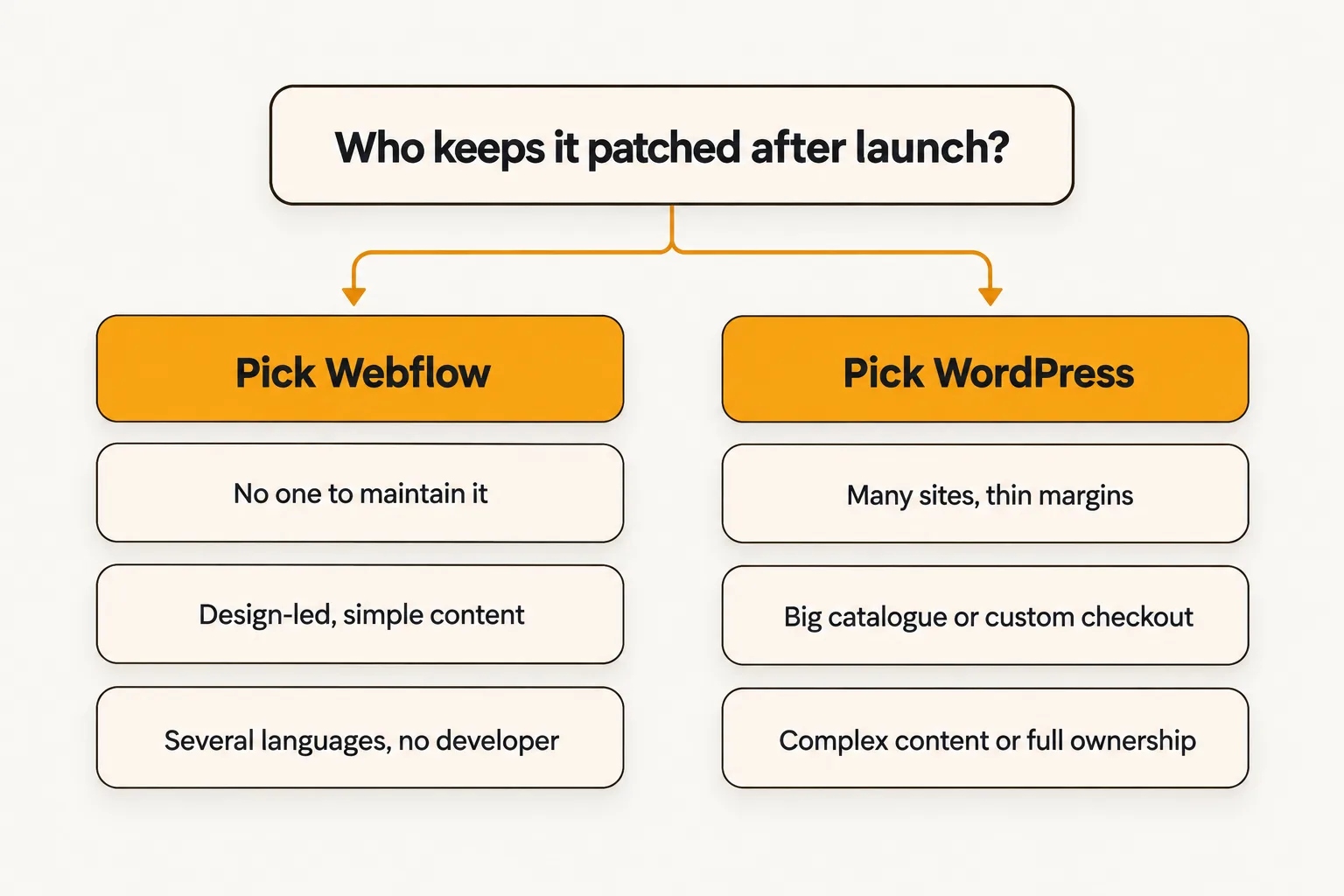
Here's the question I promised at the start: once the site is live, who will keep it patched?
If the honest answer is nobody, pick Webflow, and treat its higher price as the cost of not needing anyone. If it's you, a developer or a managed host, WordPress gives you more room for the same money or less.
Case by case, it breaks down like this.
Pick Webflow if…
- Nobody will look after the site after launch, and you want one bill for hosting, updates and security.
- The site is design-led, with custom layouts and animation, and its content is simple: a blog, a portfolio, some case studies.
- You publish in several languages and have no developer on hand.
Pick WordPress if…
- You run many sites, or build them for clients on thin margins.
- You need a big catalogue, past the 500 items where Webflow's next plan costs $74 a month billed yearly, or custom checkout logic.
- Your content model is complex, or you want to own your files and database and change hosts without a rebuild.
Frequently asked questions
Before you pay for either, build the same homepage on both. Webflow's Starter plan is free with no time limit, WordPress.com has a free plan too, and the one you'd happily open again next week is probably your answer.
Some links here are affiliate links. If you buy through one, I may earn a commission at no extra cost to you, and it never changes the verdict. Prices and limits are as of 21 and 24 September 2026, while hosting prices come from my own posts, last updated in May and June 2026.