Budgeting for a Webflow site? Webflow pricing looks like one number on the plan cards: $25 a month for Premium, billed yearly.
The real bill is often bigger. Add Webflow's own analytics and one extra language, and the same site costs $43 a month. Every price is also per site, so ten client sites start at $250.
Then there's the ceiling. The next plan up, Team, costs $2,500 a month on an annual contract, with nothing self-serve in between.
Pick wrong and you pay for a CMS you never use, or hit that ceiling after a client has signed. My pick for each case comes just before the FAQ.
Every Webflow price here is as of 21 September 2026, from its pricing page (both billing toggles) and help centre. Some links are affiliate links, disclosed in full at the end.
What does Webflow cost in 2026?
Here's what Webflow charges as of 21 September 2026. Every price is per site, in US dollars, with tax added at checkout.
| Plan | Billed yearly | Billed monthly | Best for |
|---|---|---|---|
| Starter | Free | Free | Building and learning, not launching |
| Basic | $15/mo | $25/mo | Simple sites with no CMS |
| Premium | $25/mo | $39/mo | Blogs and anything with repeating content |
| Team | $2,500/mo | Not offered, annual only | Organisations that need governance |
| Enterprise | Custom | Custom | Talk to sales |
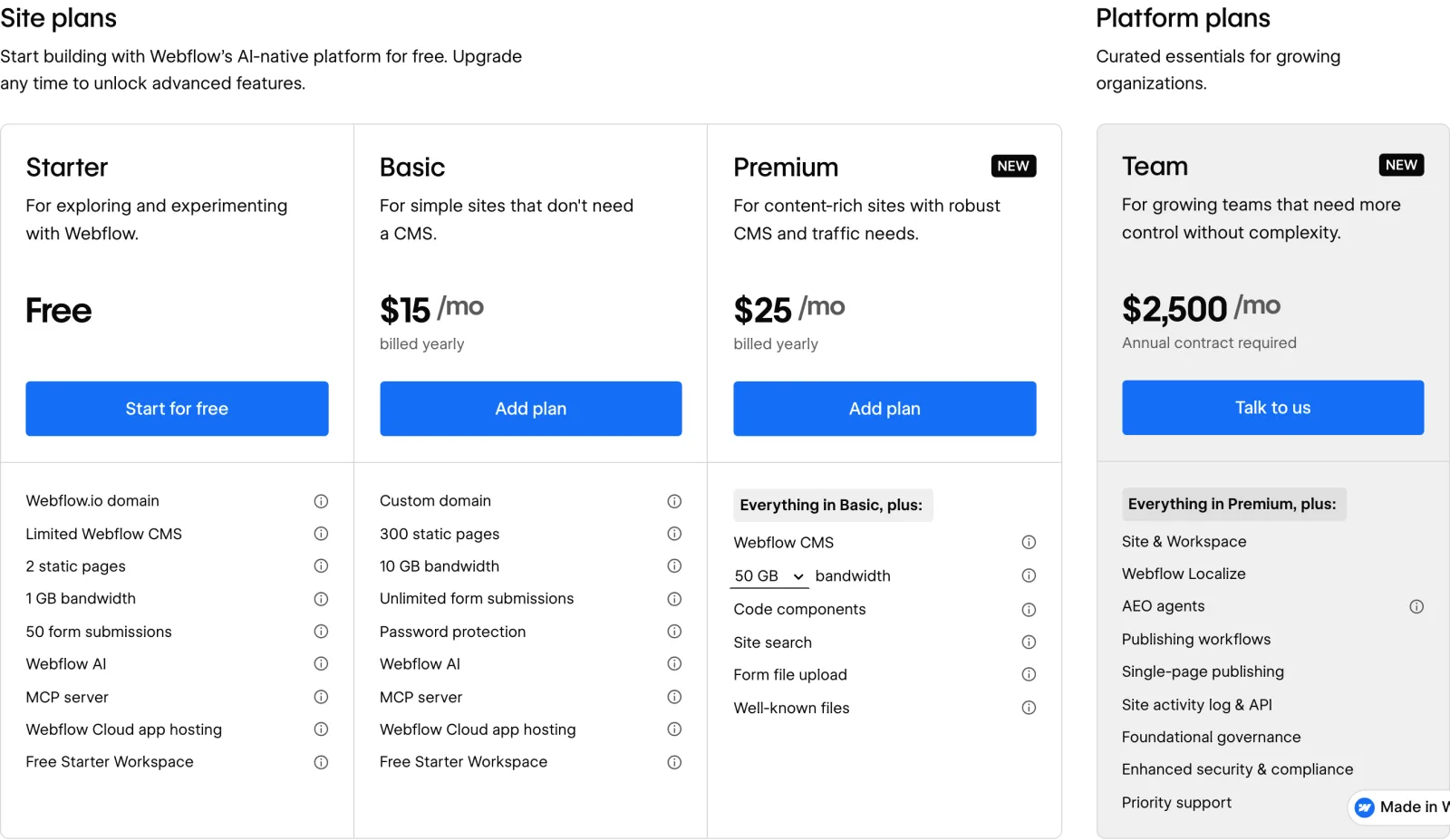
Of the site plans, only Premium is new. It replaced the old CMS and Business plans on 13 May 2026, the same day Team launched.
Basic stayed, but its price rose from about $14 to $15 a month billed yearly, and its static page limit doubled from 150 to 300.
Selling products? Ecommerce is a separate ladder
Stores pay for Webflow's Ecommerce plans instead, which the May 2026 changes left alone:
| Ecommerce plan | Billed yearly | Billed monthly | Transaction fee | Items |
|---|---|---|---|---|
| Standard | $29/mo | $42/mo | 2% | 500 |
| Plus | $74/mo | $84/mo | 0% | 5,000 |
| Advanced | $212/mo | $235/mo | 0% | 15,000 |
Standard's 2% fee comes on top of your payment processor's own fees. Plus costs $45 a month more billed yearly, which makes it the cheaper plan once a store sells more than about $2,250 a month, or $2,100 on monthly billing.
Can you try Webflow for free?
Yes, for as long as you like, because the free Starter plan never expires. It comes with the full designer, a limited CMS, Webflow AI, the MCP server and Webflow Cloud app hosting. What it won't give you is a launch:
- Your site lives on a webflow.io subdomain rather than your own domain.
- You get 2 static pages and 50 form submissions.
- Bandwidth is capped at 1 GB a month (the help centre describes Starter as up to 1,000 monthly visits).
- The CMS holds 50 items across up to 20 collections.
So you can design a homepage and one inner page, learn the tool and show a client a working prototype without paying anything. You just can't ship it.
The free plan has a CMS, and Basic doesn't
This catches people out. Starter includes that limited CMS, but Basic, the $15 plan, has none at all, so moving from free to Basic takes the CMS away. If your prototype uses even one collection, your first paid plan is Premium.
The 14-day refund, and what it doesn't cover
Under Webflow's refund policy, updated in September 2026, new Site and Workspace plans, monthly or annual, are fully refundable if you cancel within 14 days.
After that there's no refund, and renewals, add-ons, seats, AI credits and bandwidth auto-upgrades are never refundable.
How much does paying yearly save?
Webflow's toggle promises you'll "Save up to 40%" by paying yearly. I checked both toggles, and the "up to" is doing honest work, because only Basic gets the full 40% while Premium saves about 36%.
| Plan | Monthly | Yearly (per month) | You save |
|---|---|---|---|
| Basic | $25 | $15 | $120 a year, exactly 40% |
| Premium | $39 | $25 | $168 a year, about 36% |
Workspace plans save less (32% on Core, 18% on Growth), and there's no lifetime plan at any price.
Paying yearly means committing before you know whether the project will last, and the refund only covers the first 14 days. So my rule splits two kinds of doubt:
- If you doubt the tool, buy yearly and treat the 14-day refund as your trial.
- If you doubt the client, pay monthly for year one, then switch to yearly at renewal once the site is clearly permanent.
On Premium that insurance costs $14 a month. If the client walks away in month four, you've paid $156 instead of the $300 a yearly plan costs. Monthly stays the cheaper bet until month eight, when your running total reaches $312.
Are there any other discounts?
One: nonprofits get 50% off a new annual Premium plan, which works out at $12.50 a month for the first 12 months. It's in Webflow's help centre (updated 1 July 2026), not on the pricing page.
It only works on a new plan, so an existing site must cancel and re-buy, going offline until its domain is reconnected, and it renews at full price after 12 months.
Student and educator discounts ended on 28 February 2026, and Webflow for Startups closed on 30 June 2026. There's no agency discount either.
Already on an older plan? Check your date
Older plans move to the new prices at your first renewal or billable change on or after one of two dates:
- 29 June 2026 for most existing sites.
- 16 November 2026 for sites in Freelancer or Agency Workspaces, or on legacy pricing from 2022 or earlier.
That November date is still ahead, and according to Webflow's help centre, switching from monthly to yearly billing before your date keeps your old plan for one more year.
Former Business sites also drop from 100 GB of included bandwidth to Premium's 50 GB, and heavier sites get paid bandwidth add-ons at the switch. If your current invoice beats Premium's $25 yearly, or the tier your traffic needs (100 GB is $45), switch to yearly before your date.
Basic or Premium: what does the extra $10 buy?
Mostly the CMS. Premium costs $10 a month more than Basic billed yearly, or $14 more billed monthly.
| Feature | Basic | Premium |
|---|---|---|
| Price, yearly / monthly | $15 / $25 | $25 / $39 |
| Static pages | 300 | 300 |
| CMS | None | 20,000 items, 40 collections |
| Bandwidth per month | 10 GB | 50 GB, up to 2.5 TB |
| Form submissions | Unlimited | Unlimited |
| Extras | Custom domain, password protection | Adds code components, site search, 10 MB form uploads, well-known files |
Basic is the brochure-site tier, built for something like a five-page local business site that barely changes. The moment you want a blog, a portfolio or a case-study library, you need Premium.
Not sure a blog is coming? Start on Basic, because Webflow's help centre confirms you can upgrade later without rebuilding the site.
Hosting Webflow Cloud apps? Premium allows 15 instead of 5, and the help centre says putting them on a custom domain needs Premium.
What will a real Webflow site cost each month?
Three costs stack on top of the plan price: add-ons, bandwidth and AI credits. Only bandwidth can land on your bill without you choosing it.
Add-ons: one costs twelve times the plan
These are Webflow's add-on prices as of 21 September 2026:
| Add-on | Billed yearly | Billed monthly | Scales by |
|---|---|---|---|
| Optimize | From $299/mo | From $379/mo | Page views, 25,000 to 500,000 |
| Analyze | From $9/mo | From $12/mo | Sessions, 2,000 to 500,000 |
| Localize Essential | $9 per locale/mo | $12 per locale/mo | Up to 3 added locales |
| Localize Advanced | $29 per locale/mo | $35 per locale/mo | Up to 10 added locales |
Read the first row again. Optimize starts at $299 a month billed yearly, about twelve times the Premium plan it attaches to. It buys A/B testing, personalisation and audience targeting, and its top tier costs $1,199 a month, or four years of Premium every month.
Analyze is priced for ordinary sites, from $9 for 2,000 sessions a month up to $229 for 500,000.
Localize is priced per added locale, meaning each extra language, and that's easy to misread. Three extra languages on Essential cost $27 a month, not $9, and ten on Advanced cost $290.
Advanced adds localised images and URLs, automatic visitor routing and 50,000 AI-translated words per locale a month instead of 10,000. You can try Localize free on any plan and pay only when you publish.
So what does a realistic content site cost? Here's my arithmetic for Premium, entry-level Analyze and one extra language on Localize Essential:
That assumes fewer than 2,000 sessions a month. At 10,000 sessions the total rises to $63 billed yearly, or $90 monthly, while swapping Analyze for a free analytics script cuts it to $34 billed yearly.
Bandwidth: the add-on you don't get to choose
Premium includes 50 GB a month. Each extra GB costs roughly $0.40 billed yearly or $0.60 monthly, sold in tiers whose totals include the Premium base price:
| Premium bandwidth | Billed yearly | Billed monthly |
|---|---|---|
| 50 GB (included) | $25/mo | $39/mo |
| 100 GB | $45/mo | $69/mo |
| 500 GB | $199/mo | $299/mo |
| 1 TB | $399/mo | $599/mo |
| 2.5 TB | $999/mo | $1,499/mo |
Webflow gives no visits figure for paid plans, since that depends on how heavy your pages are, and bot traffic counts too. Check your site usage dashboard before you pick a tier.
Basic has no bandwidth tiers of its own, so going over its 10 GB two months running moves a Basic site up to Premium.
A viral month costs nothing at first, because Webflow just notifies you and calls it surge protection. Go over a second month running, though, and it upgrades you automatically, based on the lower of the two months.
That upgrade isn't refundable, although you can step back down once traffic falls, so if your traffic is climbing, choose your tier before Webflow does.
AI credits: free to open, metered to use
Webflow AI and the MCP server, which lets you work on your site from Claude or Cursor, come free with every site plan. Using the AI is metered, though, and Webflow has enforced credit limits since 29 June 2026.
Credits belong to your Workspace plan and are shared across every site in it. The free Starter Workspace gets 200 a month, Core or Freelancer gets 300, and Growth or Agency gets 400.
Extra packs of 2,000 credits cost $20 a month billed yearly or $25 billed monthly, and unused credits don't roll over. Webflow doesn't publish how many actions a credit covers, because heavier tasks use more, but running out never triggers a charge.
What do ten client sites cost on Webflow?
Every site needs its own plan, so three client sites on Premium cost $75 a month, not $25. Ten cost $250 billed yearly or $390 billed monthly, and there's no volume discount.
The free Starter Workspace already allows unlimited paid sites, but agencies often add a paid Workspace for staging and client access:
| Workspace plan | Billed yearly | Billed monthly | What it adds |
|---|---|---|---|
| Freelancer | $16/mo | $24/mo | 10 staging sites, client payments |
| Agency | $35/mo | $42/mo | Unlimited staging, 3 free client seats per site, publishing permissions |
| Core | $19/mo | $28/mo | 10 staging sites, code export |
| Growth | $49/mo | $60/mo | Unlimited staging, site-level roles, publishing permissions |
Every Workspace plan includes one full seat. Extra full seats cost $39 a month and limited seats $15, billed yearly ($45 and $19 monthly), and reviewer seats are free.
The ten-site bill, with my arithmetic from those list prices:
That $250 doesn't have to be yours, though. Freelancer and Agency Workspaces include client payments, which let each client put their own card on file for their site plan.
The real question is whether a client will pay $25 to $39 a month for hosting when WordPress hosting starts at a few dollars.
The $25 to $2,500 cliff: what does Team buy?
Team is a platform plan: one annual contract that bundles a site, a Workspace and add-ons. At $2,500 a month, or $30,000 a year, it costs 100 times Premium billed yearly, or about 64 times on monthly billing.
Some of that money buys bigger limits: up to 30 TB of bandwidth, 500 static pages, 100 CMS collections, 10 seats (5 full, 5 limited), 100,000 AI credits a year and two Localize locales. Its CMS API also allows 600 requests a minute, five times Premium's 120.
The rest buys organisational machinery: publishing workflows, page branching, single-page publishing, AEO agents and a site activity log with its own API. On top come governance, enhanced security and compliance, 24/7 priority support (a 12-hour response on major incidents) and a 99.00% hosting uptime SLA.
How much of that could you buy self-serve? Here's the closest match for Team's seats, locales and credits, billed yearly, by my arithmetic:
Team costs about six times as much and still covers one site, so roughly $2,100 a month pays for workflow and governance features no self-serve plan sells. For a company with a compliance requirement, that's unremarkable.
The trouble is the middle. A ten-person agency or a SaaS company with a busy blog may need publishing workflows and an activity log, but not enterprise governance. There's no plan for them, so they either juggle separate $25 Premium sites by hand or jump to $2,500.
The $49 Growth Workspace comes closest, adding site-level roles and publishing permissions, but not workflows, page branching or an activity log.
My take: this isn't an accident. Premium is priced to win individuals and small sites, and everything above it has been folded into a sales conversation.
Is Webflow cheaper than WordPress?
For one content site, a comparable WordPress setup runs roughly:
- Hosting: about $3 to $12 a month, depending on host and term, from my Hostinger review and affordable WordPress hosting comparison (not re-checked for this update).
- Page builder: Elementor Pro at $59 a year on its Essential plan, which is about $5 a month (as of 21 September 2026).
- Domain: about $1 a month, also not re-checked, and billed separately from hosting, as domain vs hosting explains.
Call it $9 to $18 a month, against about $26 for Webflow Premium plus the same $1 domain. That's cheaper, but not dramatically, and the gap narrows once you count the plugin upkeep my WordPress security checklist describes.
Webflow wins on maintenance, with no plugins to patch, and in my view its designer beats any WordPress page builder.
WordPress wins on scale. One host can carry many sites, growth needs a bigger server rather than a sales call, and you own your code and data.
The per-site multiplier is where it tips. Ten Webflow Premium sites cost $250 a month, while ten WordPress sites can share one hosting plan (a multi-site builder licence costs more).
Price is only one row of that decision, though. My Webflow vs WordPress comparison covers ownership, plugins and upkeep as well.
For client work, my guide to handing Elementor sites over to clients helps cut the support calls afterwards. If you'd rather own the whole stack, moving from WordPress to Next.js means more control and more work.
Where Webflow's pricing falls short
The biggest flaw is the missing middle. A growing team that needs publishing workflows has no plan between $25 and $2,500 a month, and the $2,500 one is annual-only.
- Per-site pricing punishes agencies: twenty client sites are twenty line items, with no volume discount.
- Optimize starts at $299 a month, which makes A/B testing an enterprise feature wearing an add-on badge.
- Bandwidth bills you without asking: two months over your tier and Webflow upgrades you, with no refund.
- AI is metered at 200 to 400 credits a month, with no rollover and no published rate for what a credit buys.
- The special discounts are nearly gone, and only the nonprofit one is left as of September 2026.
Skip Webflow if you run many small client sites on thin margins, or if you want to own your code outright. WordPress on one good host will serve you better, and for less.
Building a design-led marketing site with a small CMS? Read Framer vs Webflow before you commit, because Framer's entry plan costs less.
Which Webflow plan should you buy?
My default is Premium, but the right plan turns on whether you need a CMS and how many sites you run:
- Learning Webflow or prototyping for a client: Starter, which is free with no clock until you want a real domain.
- A brochure site with no blog: Basic at $15 a month billed yearly, since there's no point paying for a CMS you won't use.
- Any site with a blog, portfolio or repeating content: Premium at $25 a month billed yearly.
- A nonprofit: Premium on a new annual plan, with the 50% discount bringing year one down to $12.50 a month.
- A store: Standard at $29 a month billed yearly, moving to Plus once sales pass about $2,250 a month.
- Several client sites: Premium for each, paid by each client through client payments, unless one WordPress host would carry them all for less.
- Publishing workflows, governance or an activity log: Team, with a $30,000-a-year budget, because there's no smaller version.
- An old plan billed monthly, in a Freelancer or Agency Workspace or on pricing from 2022 or earlier: decide before 16 November 2026 whether to switch to yearly and keep it another year.
Frequently asked questions
Design on the free plan, and do the multiplication before you scale.
Your next step: build your homepage and one inner page on Starter this week. If the designer suits you, the plan list above tells you what launching the rest will cost.
Some links here are affiliate links. If you buy through one, I may earn a commission at no extra cost to you, and it never changes what I recommend. Webflow prices are as of 21 September 2026, from its pricing page (both billing toggles) and help centre. The WordPress hosting and domain figures were not re-checked.