The best WordPress MCP server plugins of 2026 can give an AI assistant access to live content. Choose the wrong permissions, and a draft-editing task can change a published page.
The awkward part is comparing ready-made toolkits with the official adapter's foundation for custom abilities. Hosted connectors add another service and usage allowance.
The six options below come from their official documentation and pricing, as of October 20, 2026. This is a researched comparison, not a hands-on benchmark.
You'll get the catches, a cost example and copyable staging tests, with my picks by scenario near the end. New to the protocol? Start with the plain-English MCP guide, then use this comparison to choose your WordPress connection.
How I compared these WordPress MCP plugins
Official plugin listings, documentation, changelogs and public pricing pages are as of October 20, 2026. I also opened the purchase pages in a browser: some prices and plan options were missing from their text-only versions.
This is a documentation-based shortlist. I have not installed these six plugins on a common test site, benchmarked their speed or audited their code. The screenshots below show public vendor pages, and the staging tests are instructions for your evaluation, not results I measured.
My selection criteria put the actual job ahead of the advertised tool count:
- Can the plugin perform the specific content, SEO, store or builder operation you need?
- Can you restrict the connected account and tools before the first write?
- Does the connection run directly to WordPress or depend on a hosted service?
- What happens after a mistaken edit: revision restore, plugin undo, backup restore or manual repair?
- What do the license, connector allowance and external services cost together?
The six entries cover different jobs. Their order is a reading order, not a laboratory ranking. My recommendations by scenario come after the implementation checklist.
Compare the connection, the tools and the bill
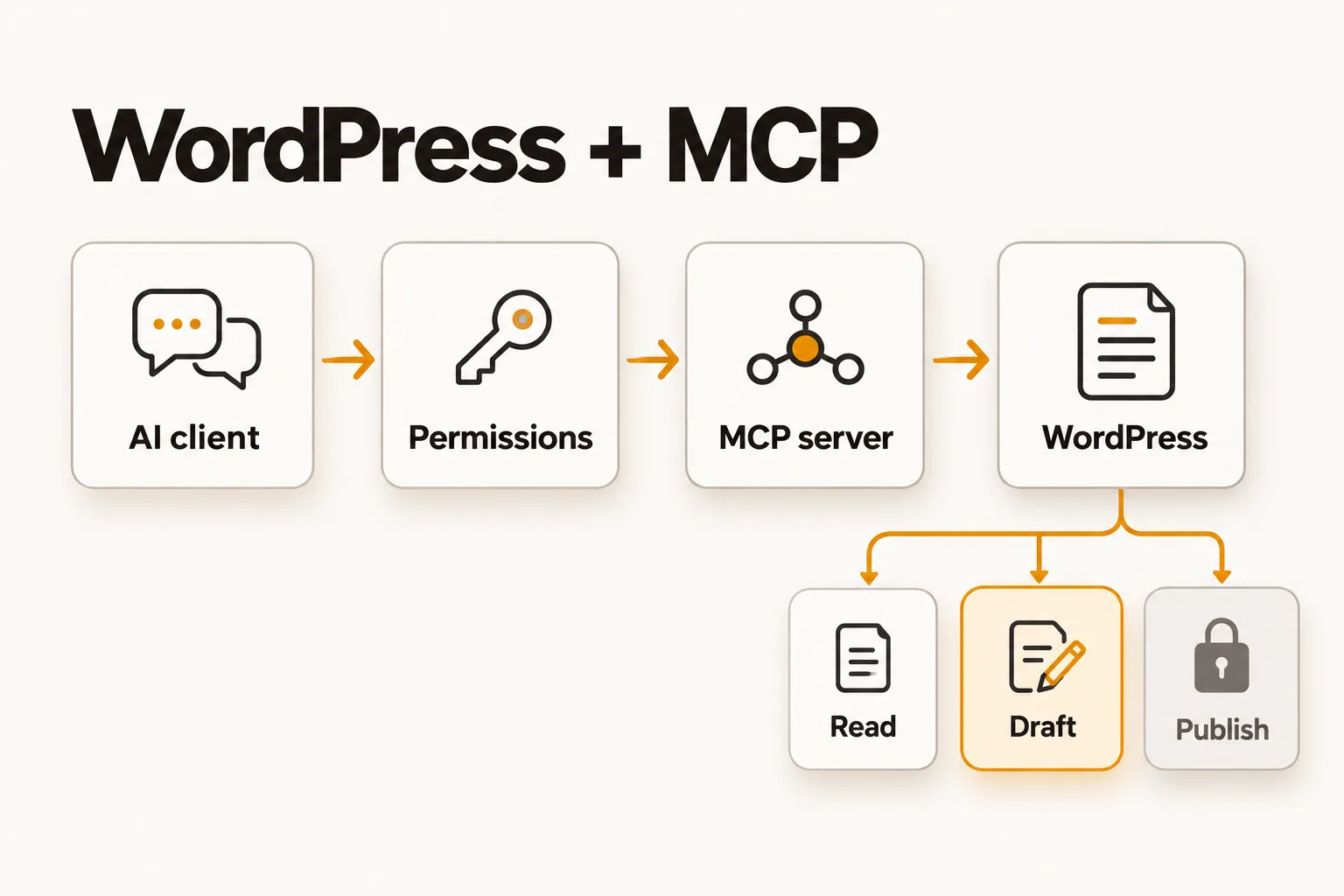
An MCP server lets an AI client discover and call tools. In WordPress, those tools might retrieve a post, create a draft or update a product. The server supplies access; the AI client decides which available tool to request.
The WordPress Abilities API gives plugins a common way to register operations. The official MCP Adapter exposes eligible abilities through MCP. A plugin that supplies ready-made editorial or store tools solves an additional problem. See the official adapter architecture for that distinction.
That distinction prevents an expensive misunderstanding: installing an adapter does not guarantee your SEO plugin or page builder becomes fully editable from chat.
| Plugin | Best-fit shortlist | Connection model | Entry cost as of October 20, 2026 | Main limitation |
|---|---|---|---|---|
| Easy MCP AI | Content and SEO workflows | Server inside WordPress | Free plugin; external services separate | Force Draft on Create has a narrower scope than its name suggests |
| Royal MCP | Existing Elementor or Divi sites | Direct WordPress endpoint | Free; Pro Personal card shows $99/year for one site | Structural builder work belongs to Pro; undo has limits |
| AI Engine | Sites already using Meow Apps AI features | Built-in WordPress MCP server | Free basic MCP; Pro Starter $69/year for one site | Advanced administration requires Pro |
| WPVibe | Managed connection across multiple sites | Hosted WPVibe service plus plugin | Free allowance; Pro $99/year | Daily tool-call allowance and vendor dependency |
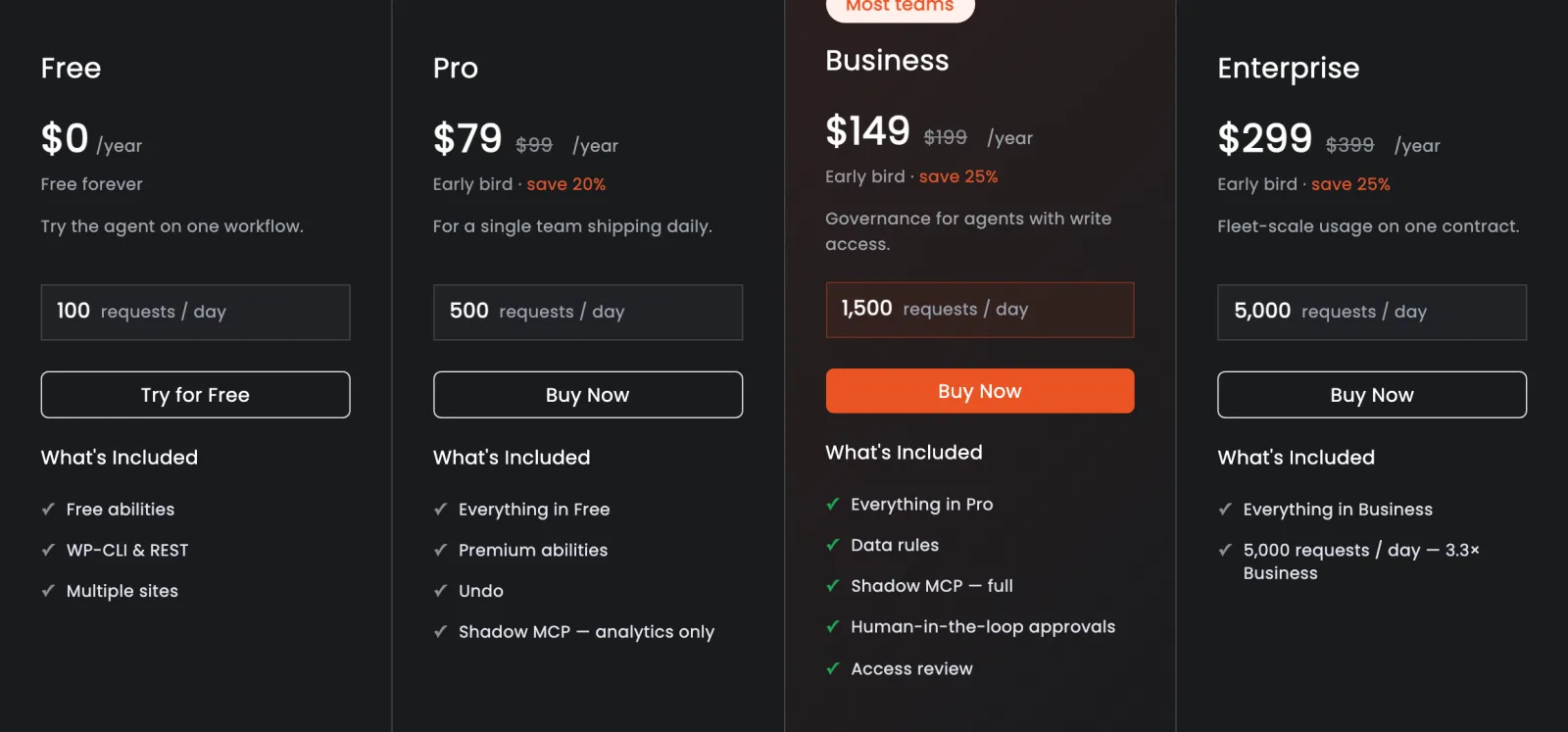
| miniOrange Secure MCP Server | Teams evaluating role-based governance | Plugin; vendor gateway also documented | Free allowance; Pro advertised at $79/year | Clarify connection route and paid policy features |
| WordPress MCP Adapter | Developers exposing custom abilities | HTTP or local STDIO through WP-CLI | Free open-source package | Requires useful abilities and an integration owner |
Prices are in US dollars and exclude taxes, AI services and optional integrations. The product sections link to the underlying sources. Promotional pricing can change before you finish evaluating a plugin.
Why a larger tool count does not settle the choice
One server can expose a generic REST request tool that reaches many operations. Another can expose a separate tool for each operation. Counting tool names does not tell you which preserves your page layout or checks the right permission.
Ask for a demonstration of your exact workflow. For an SEO team, that could be reading a post, suggesting a new description and saving it to the correct SEO field. For a store, it could be changing one variation's stock without touching its price.
If REST APIs are unfamiliar, the plain-English API guide explains the underlying request-and-response model. MCP gives the AI client a standard way to discover and use that functionality.
Six WordPress MCP server plugins worth shortlisting
1. Easy MCP AI: content and SEO in one connection
Easy MCP AI is maintained by Themeisle. Its directory changelog records Themeisle's acquisition in September 2026. The plugin runs on your own WordPress site and combines publishing tools with connections to analytics and SEO data sources. Sources: plugin listing and changelog, product overview.
I would shortlist it for an editorial team that wants to move from traffic data to a proposed content update. The useful distinction is having analysis and WordPress actions available in the same conversation.
Standout features documented by the vendor:
- OAuth and API-token connections tied to WordPress users, with selectable tool access.
- Integrations for SEO fields, WooCommerce and custom fields when the relevant plugins are active.
- External data connections including Google Analytics, Search Console and SEO providers.
- Audit logging and before-and-after change history.
The catch is specific. Force Draft on Create is off by default and covers Easy MCP's own creation tools. It does not cover later edits or third-party abilities. Turning it on does not create a universal approval queue.
The current directory description spells out those boundaries.
For an editorial pilot, combine a restricted WordPress account with narrowly selected tools. Review the vendor's token and permission controls before connecting. If you need access restricted to individual posts, the listing says that control is not available; evaluate a different permission design.
| Pros | Cons |
|---|---|
| Useful combination of site actions and external SEO data | Provider accounts, API access and fees remain separate |
| Direct connection with tools you can restrict | Draft-on-create does not protect every subsequent write |
2. Royal MCP: builder edits with a recovery path
Royal MCP comes from Royal Plugins. The vendor dates its free release to January 2026 and its Pro offering to August. Its strongest reason to make this shortlist is the documented split between basic page edits and deeper Elementor or Divi authoring. Sources: Royal MCP overview, Pro features.
Free covers tasks such as inspecting, cloning and changing text or images in supported builder content. Pro adds structural authoring and more advanced builder operations. That matters when your requirement is to keep a page editable in its original builder.
Standout features:
- Direct MCP connections with OAuth or API-key options.
- Read-only and Drafts only controls, plus access levels for individual clients.
- Before-and-after records and undo for supported changes.
- Pro tools for deeper builder editing, bulk operations and connection-specific tool profiles.
Undo needs a closer look than a check mark. The safety and recovery documentation describes recovery boundaries; treat it as a feature to test with your exact data. A successful undo of a paragraph is not evidence that every store operation can be reversed.
| Pros | Cons |
|---|---|
| Clear distinction between basic edits and builder authoring | Advanced builder operations require Pro |
| Documented restrictions and recovery controls | Undo windows and supported operations need verification |

3. AI Engine: MCP alongside your existing AI features
AI Engine is developed by Meow Apps. Its product history dates the project to December 2022 and its built-in MCP server to April 2025. It also supplies chatbots, content generation and other WordPress AI features. Source: AI Engine's product history.
Skip the wider toolkit if all you need is a small connector. I would consider AI Engine first when those features are already part of your site. Adding a second connector creates another configuration to maintain; check whether AI Engine already exposes the operations you need.
Standout features:
- Basic WordPress MCP server functionality in the free version.
- Pro tools for WooCommerce and database, theme and plugin management.
- Additional tools registered by compatible Meow Apps plugins.
- A wider AI toolkit that can share the same WordPress installation.
The free-versus-Pro distinction matters. The current product comparison explicitly lists a WordPress MCP server under Free and advanced MCP tools under Pro. Advice that all AI Engine MCP access requires a paid license is too broad.
Model usage is another line item. Meow Apps describes a bring-your-own-key approach for its AI features. An external AI client's own billing is separate again; installing a plugin does not include the assistant's inference costs.
| Pros | Cons |
|---|---|
| Practical fit for sites already using the Meow Apps ecosystem | More functionality to configure if you only need a small connector |
| Basic MCP can be evaluated without a Pro license | Advanced administrative tools are paid and need careful scoping |

4. WPVibe: a managed connection for multiple sites
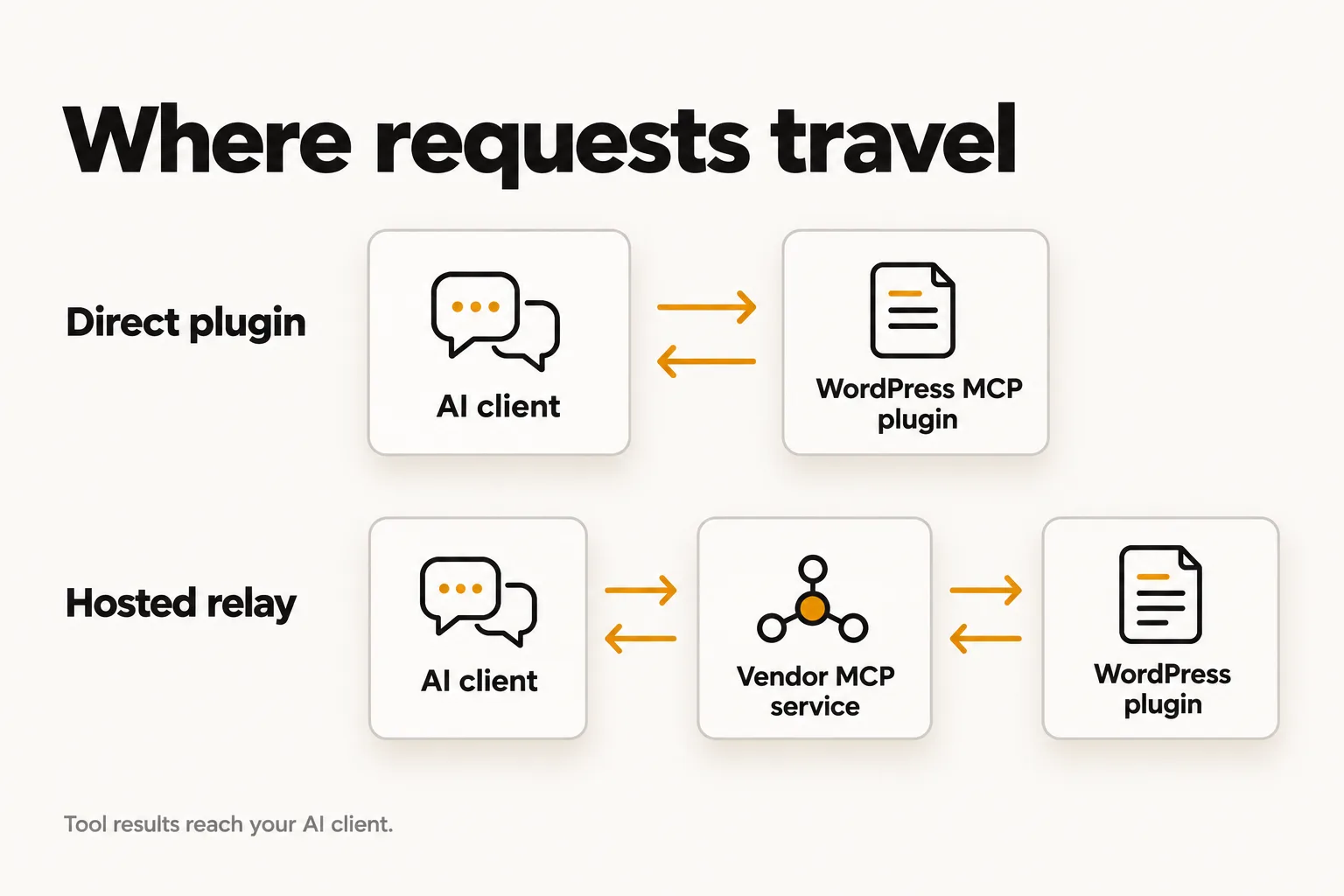
WPVibe is built by SeedProd. Its plugin directory slug remains vibe-ai, while the current product name is WPVibe. Unlike a direct-only plugin, it connects through a hosted service that relays authenticated requests to WordPress. Source: WPVibe's service disclosure.
The managed connection is the reason I would evaluate it. If your team wants one service for several sites, that convenience can be worth paying for. It also introduces another vendor into the request path.
Standout features:
- A guided authorization flow and multiple connected sites.
- Content and media operations, with access to WordPress REST and plugin abilities.
- A draft-theme workflow for reviewing theme changes before publishing them.
- Approval controls for specified destructive operations.
Do not assume the draft-theme workflow also isolates every content edit. The directory FAQ distinguishes theme drafts from content changes. Test edits to an existing published page separately from creating a new draft.
| Pros | Cons |
|---|---|
| Managed setup and multi-site workflow | Requests depend on the hosted WPVibe service |
| Documented preview and approval features | Daily tool allowance can constrain concentrated work |
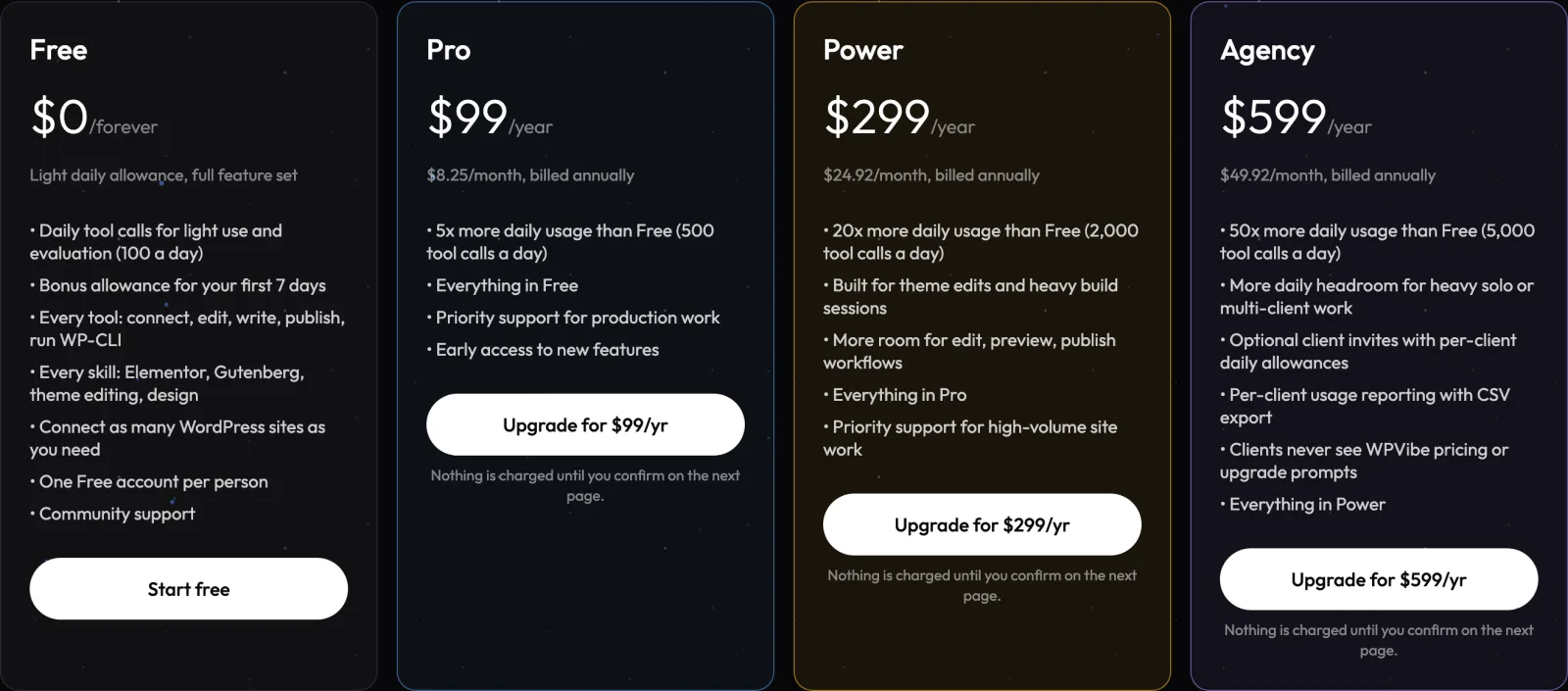
The current pricing page is the source for those allowances. Count the calls in a real workflow before choosing a plan: reading, inspecting and verifying can each consume calls without producing a new page.
5. miniOrange Secure MCP Server: evaluate its policy controls
miniOrange brings an identity-and-access-management focus to WordPress MCP. Its plugin documents agent policies, role-based tool access and capability checks. I would shortlist it when several staff roles need different access to the same site. Source: the current plugin listing.
Standout features:
- An agent registry that maps WordPress roles to allowed tools.
- Tool toggles, capability checks and activity records.
- Governed REST access for supported workflows.
- Paid governance features, including human approvals and data rules, listed on the vendor's plan page.
There is a documentation issue I would resolve before adopting it. The listing says requests connect directly without a third-party relay, but its client instructions also give a gateway.miniorange.ai endpoint. The vendor's Windsurf setup guide uses that gateway too.
That does not establish how every connection mode routes data. Ask the vendor which route your installed version uses, what passes through the gateway and whether a direct mode is supported. I would keep this recommendation conditional until those answers fit the site's requirements.
| Pros | Cons |
|---|---|
| Role-based policy design suits multi-user teams | Direct-connection and gateway documentation need clarification |
| Paid plans describe approval and data controls | A free connection does not include every governance feature |
Those figures come from the vendor's current plan table. Do not buy Pro assuming it includes the Business approval workflow.
6. WordPress MCP Adapter: the developer foundation
The WordPress MCP Adapter is the official project's bridge between WordPress abilities and MCP. It belongs to the AI Building Blocks initiative and is distributed as an installable plugin as well as a developer dependency. Sources: repository, installation guide.
This is my shortlist entry for a custom business operation: for example, exposing a narrowly scoped inventory lookup from an existing plugin. A developer can define the operation and its permission check rather than enabling a broad administrative toolkit.
Standout features:
- HTTP transport and local STDIO connections through WP-CLI.
- Conversion of registered abilities into MCP tools, resources and prompts.
- Custom server configurations and extensible handlers.
- Explicit control over which abilities the default server exposes.
The current ability documentation says exposure is opt-in. Registering an ability alone does not automatically make it available through the default MCP server. Its exposure metadata and permission callback both matter.
Follow the documentation for your installed release. A tutorial written against an older adapter version can describe different exposure rules.
| Pros | Cons |
|---|---|
| Official foundation for purpose-built integrations | Requires an owner for development, permissions and maintenance |
| Can expose narrowly defined business operations | Does not guarantee a complete editorial or builder toolkit |
What will your WordPress MCP workflow really cost?
Start with the whole workflow. A free server can still invoke paid SEO data, while a paid connector can consume its allowance during read-only investigation.
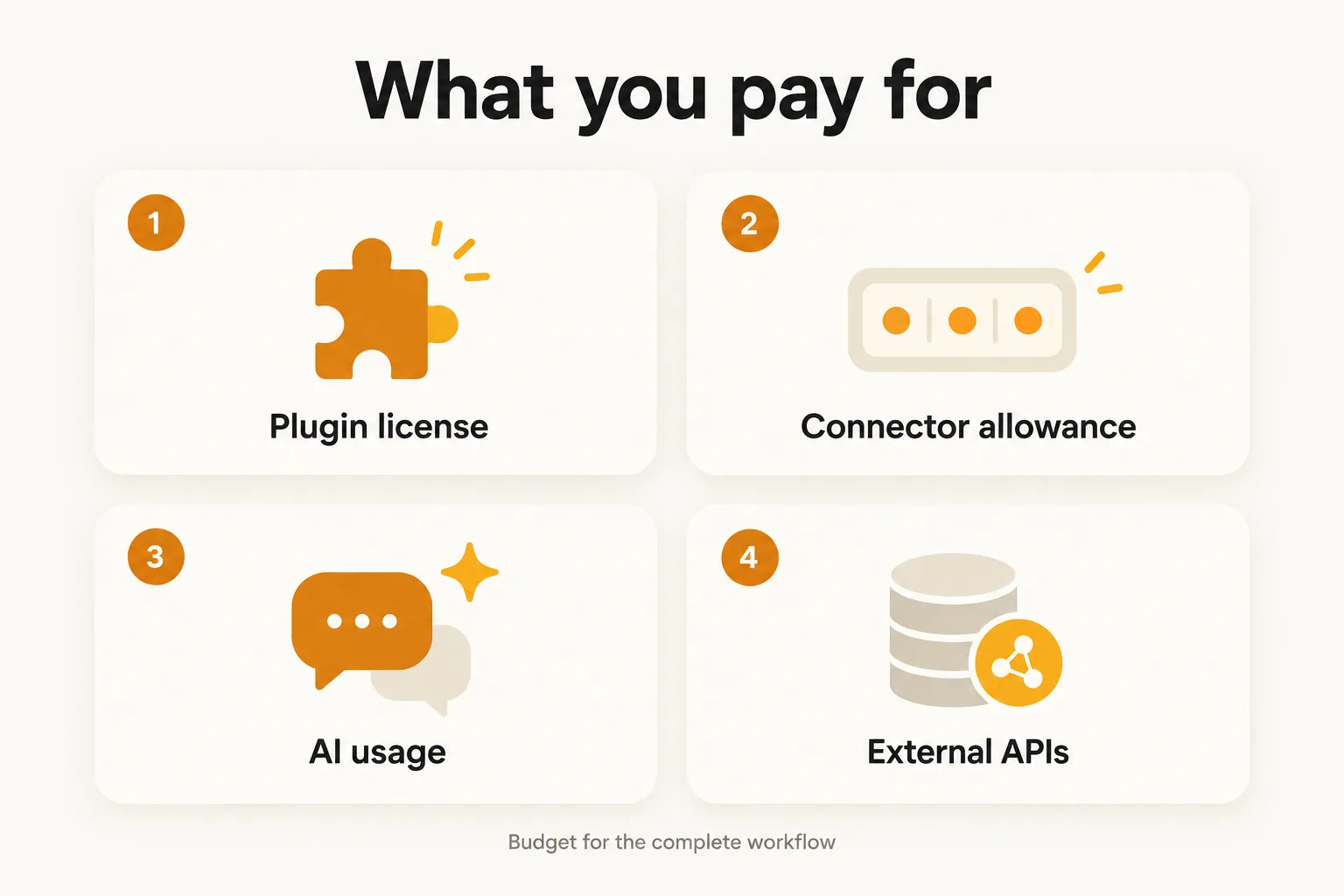
| Cost layer | What to check before paying |
|---|---|
| Plugin license | Required tools, site count, renewal rate and update access |
| Connector service | Daily allowance, shared account limits and top-up rules |
| AI client or API | Subscription limits, model usage and tool availability |
| External services | SEO APIs, image generation, storage and other connected products |
Here is an illustrative workload, not a measured benchmark. Suppose each article refresh uses four calls: read the post, read its SEO fields, write an approved change and read it back. Refreshing 30 articles would require 120 calls before discovery, retries or extra checks.
At WPVibe's documented 100-call daily free allowance, that example would not fit into one normal allowance. You could reduce the batch size or evaluate a larger plan. It would be a mistake to compare the allowance with the number of prompts you type. Source for the quota: WPVibe pricing.
The same workload on a direct plugin can still consume AI usage and hosting resources. Compare the cost of the complete job, including the time needed to review the output.
When an automation workflow is a better fit
A scheduled job with known inputs often needs a predictable sequence: receive an approved article, upload media, save a draft and notify an editor. An ordinary API workflow can handle that without an AI agent choosing every operation.
Use MCP when interactive inspection and tool selection add value. For fixed publishing pipelines, compare the workflow automation options and the webhook request flow before adding another connector.
Connect on staging and run these acceptance tests
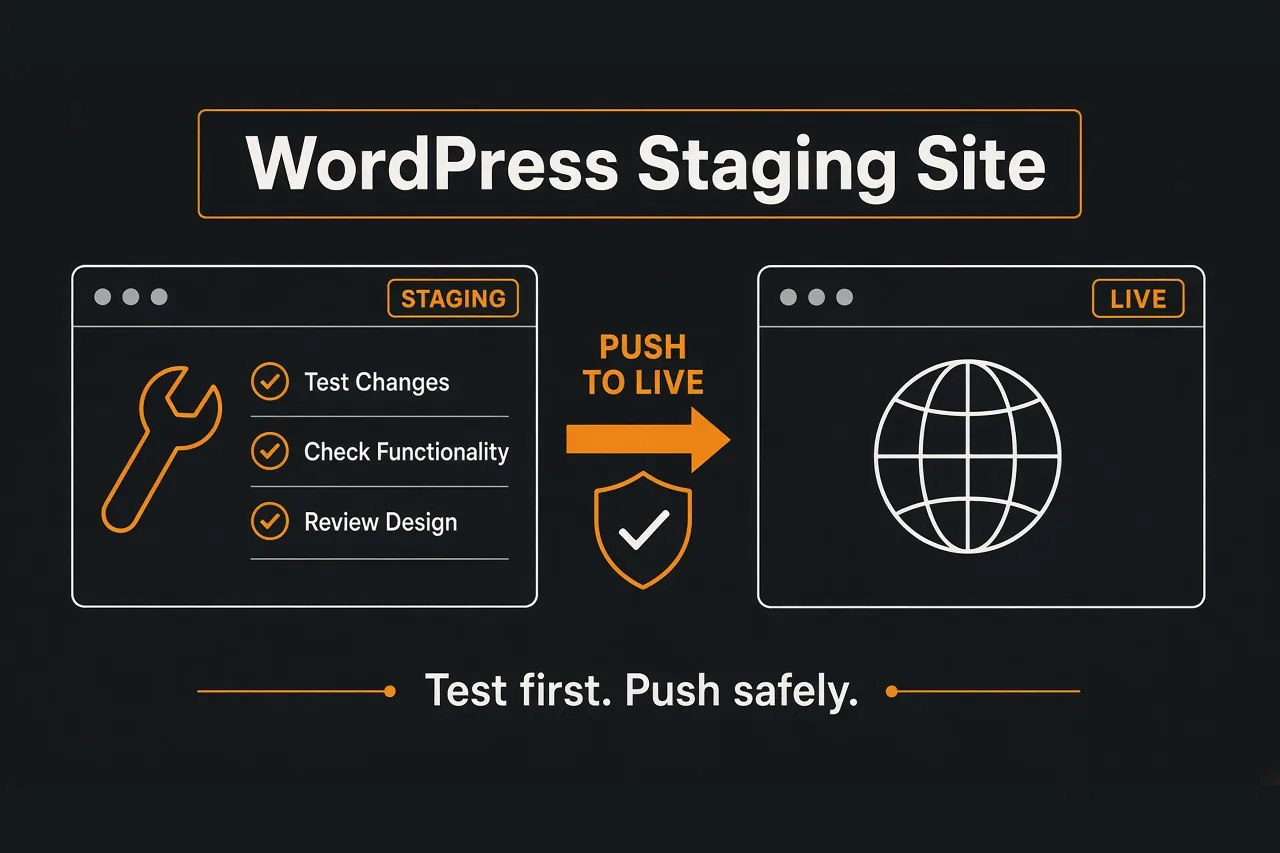
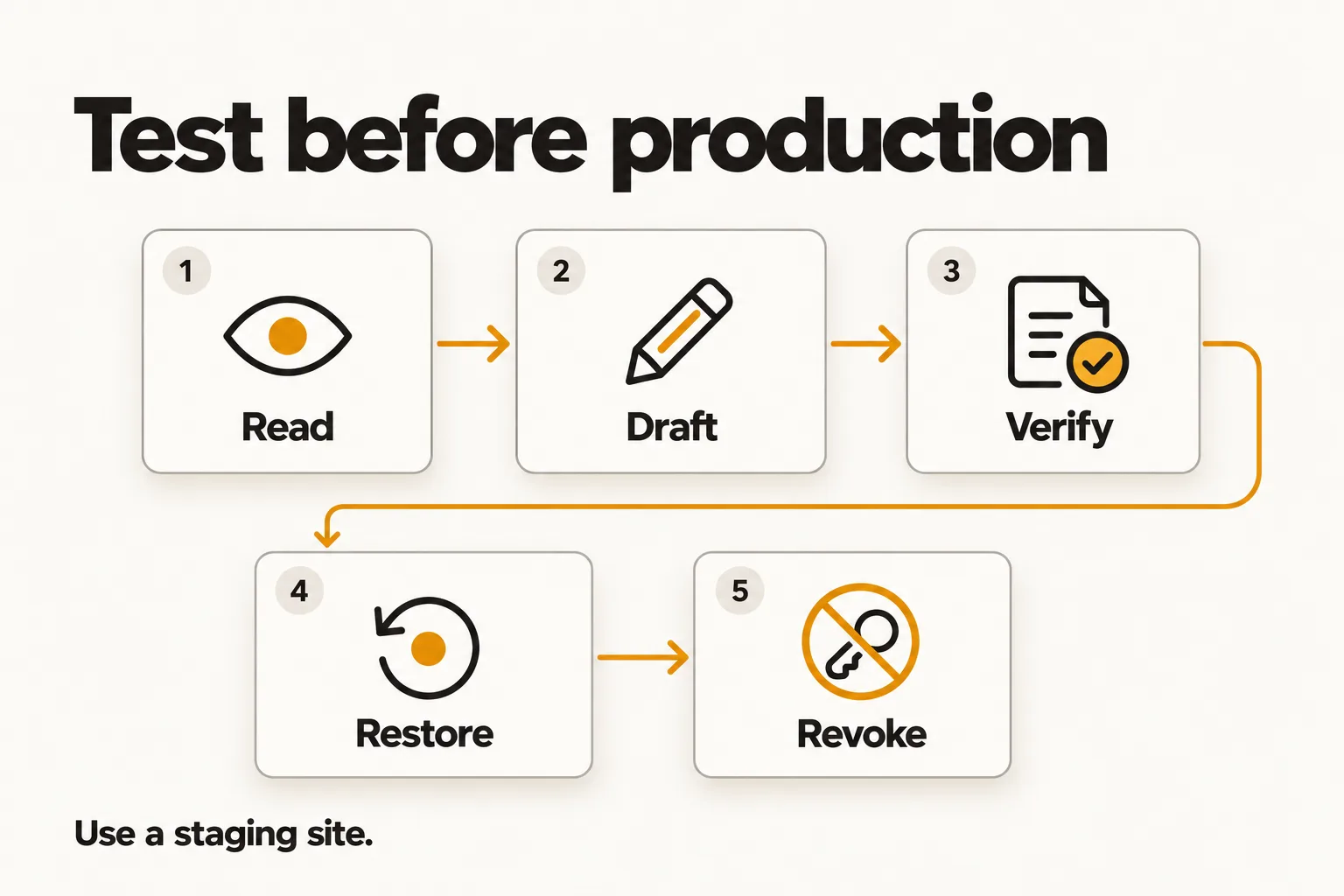
The next steps are a proposed evaluation procedure. Run them on a staging copy with sample content. Use the WordPress security checklist to cover the underlying accounts, backups and updates too.
1. Define the smallest useful permission set
Write down the job before installing anything: for example, read public posts and create draft articles. Leave user management, plugin changes, database writes and store transactions outside that first pilot.
Create a dedicated WordPress account where the plugin supports it. Choose its role and tool access together. A token restricted to an editing tool can still be too broad if that tool permits editing every published page.
2. Copy the connection details from your installed plugin
Use the endpoint and connection instructions shown by the installed release. Complete its OAuth authorization flow, or enter a token in the client's supported credential configuration. Keep credentials out of shared prompts and screenshots.
Verify that your particular client supports the transport and authentication method. A server advertising MCP compatibility does not guarantee that every client interface supports its login flow.
3. Establish a read-only baseline
Start with this prompt after enabling only the necessary read tools:
Check the returned IDs in WordPress. This catches an incorrect site connection before any changes occur. The prompt expresses your intention; server-side permissions must enforce the boundary.
4. Create one draft and verify the stored result
Allow the minimum tools needed to create and retrieve a draft, then run a bounded task:
Open the draft in wp-admin. Confirm the title, body, author and status. A timeout leaves the outcome uncertain; blindly retrying a creation request can produce duplicate content.
5. Test the integration you are buying it for
A successful plain-text draft proves little about ACF repeaters, product variations or Elementor structures. Use a disposable fixture that includes the feature you need.
| Test | Pass condition |
|---|---|
| SEO metadata | The changed field appears in the SEO plugin's own editor |
| Builder content | The page remains editable in the original builder and renders correctly |
| Custom fields | Values survive a save-and-reload round trip with their structure intact |
| Product variation | Only the intended variation and field change |
| Recovery | The supported undo or restore method returns the fixture to its previous state |
| Revocation | A new authenticated request fails after the credential is revoked |
Test permission enforcement separately using a denied write against disposable staging content. The server should reject it. An assistant choosing not to attempt a write does not prove that the server would block it.
Where WordPress MCP access falls short
A tool can save content successfully while producing the wrong result. Builder markup, structured custom fields and store records each have their own rules. Read back the saved data and inspect the relevant editor before accepting the change.
Recovery also has boundaries. Restoring a post revision does not necessarily undo an email, an external API call or a payment operation. Keep an independent backup and check exactly which data the plugin's undo feature covers.
Content returned by tools can include comments, imported HTML or other text from third parties. Treat instructions embedded in that material as content to inspect. Avoid giving a content-review session unrelated administrative powers.
Troubleshoot the failing layer
| Symptom | First checks |
|---|---|
| 401 or repeated login prompts | Credential validity, revoked access, user binding and stripped authorization headers |
| 403 response | WordPress capabilities, tool grants and a firewall challenge before WordPress |
| 404 endpoint | Exact endpoint copied from the plugin, activation and route registration |
| Connected but no useful tools | Disabled integrations, missing abilities or a stale client tool list |
| Successful call but no visible change | Stored object ID, actual field changed, editor view and page cache |
| Slow or interrupted calls | Plugin logs, host limits and whether a write completed before the timeout |
These are starting points, not diagnoses from an HTTP code alone. Easy MCP documents endpoint and authentication checks in its directory FAQ. WordPress.com also documents restarting a client or reconnecting when tool discovery becomes stale in its MCP troubleshooting guidance.
Keep firewall changes narrow and exclude authenticated MCP traffic from inappropriate page caching. Repeatedly disabling protection or retrying writes can hide the original problem.
Which WordPress MCP plugin should you choose?
For a typical self-hosted content site, Easy MCP AI is my first evaluation candidate. It combines relevant editorial and SEO integrations with documented access controls and no plugin license fee. Configure its permissions before testing writes.
For an existing Elementor or Divi site, compare Royal MCP's free tools with the exact Pro operation you need. If you already use AI Engine, check its current tools before adding another plugin. WPVibe belongs on your shortlist when managed setup and multiple connected sites outweigh the hosted-service dependency.
For a team buying governance, evaluate miniOrange against a written permission matrix and clarify its connection route first. For developers building a custom operation, start with the official MCP Adapter and expose only the abilities the workflow requires.
When you might not need another plugin
WordPress.com already offers MCP access on its paid plans, with a limited initial access period for free sites. Eligible Jetpack-connected sites can also use that service. Check the official eligibility requirements before installing a second connection layer.
That hosted service is separate from the installable WordPress MCP Adapter. Choose the route that fits where your site runs and which operations it needs.
Frequently asked questions
Choose the candidate that fits your actual task, then run the draft-and-read-back test on staging. That result is more useful than another advertised tool count.